Posted on 5 October 2025
Chart of Accounts Template Excel & Google Sheets
- The chart of accounts template is available to download in Excel and Google Sheets.
- Organizes all accounts into a clear structure, whether assets, liabilities, equity, income, expenses, or taxes.
- Improves accuracy in bookkeeping and reporting to ensure consistency across financial statements.
- Supports compliance and business insights for simplified audits, tax filings, and financial analysis.


What is a Chart of Accounts Template?
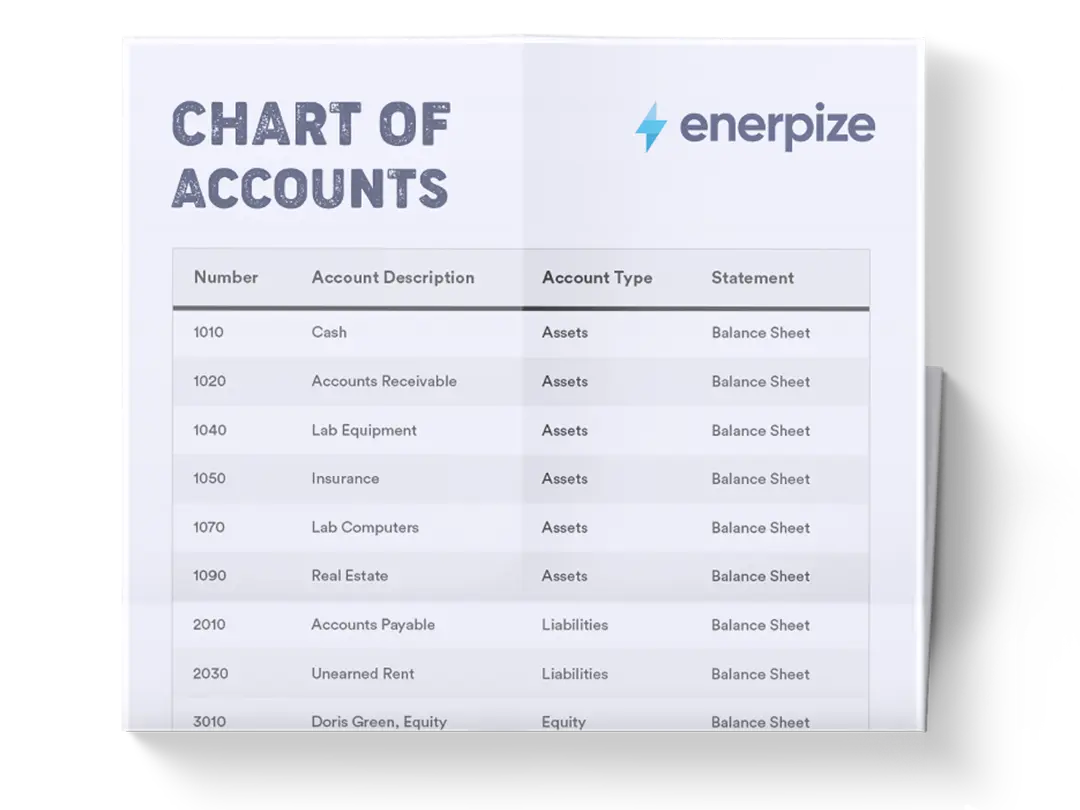
A chart of accounts (COA) template is a structured index of all the financial accounts in a company’s general ledger, categorized into assets, liabilities, equity, revenue, and expenses. Unlike a trial balance that only displays active accounts with balances, a COA lists every account available in the accounting system, serving as a master reference for recording transactions. Each account is typically assigned a unique code and descriptive name, ensuring consistency in financial reporting.
By functioning as the backbone of financial organization, a chart of accounts enables accurate bookkeeping, supports compliance with accounting standards, and ensures that key financial statements—such as the balance sheet and income statement—reflect precise, well-structured data.
Your Chart of Accounts, Built In. Enerpize comes with a ready-made chart of accounts you can customize to your business — no setup headaches, no formatting required. Start for free.
What the Enerpize Chart of Accounts Template Includes
Most chart of accounts templates floating around online give you a list of names and numbers and stop there. That is not enough once your books have more than a handful of accounts and someone other than you needs to actually use them.
Here is what the Enerpize chart of accounts template gets right that most free versions miss.
Every contra account has a partner
Look at any free chart of accounts template and you will usually find an Accumulated Depreciation account sitting on the balance sheet with nothing feeding it. Ours does not do that. Every Accumulated Depreciation and Accumulated Amortization line has a matching Depreciation Expense or Amortization Expense account on the profit and loss side, so the entry that actually posts the charge has somewhere to go. The same is true for the Allowance for Doubtful Accounts, which is paired with a Bad Debt Expense account. A contra account with nothing to record against it is a template that looks complete and cannot actually be used.
Both sides of tax, not just one
Free templates online are almost always built around a single Sales Tax Payable line, which works fine for a US business but leaves a VAT or GST business with nowhere to put the tax they can reclaim. This template includes both an Input VAT/GST Receivable account and an Output VAT/GST Payable account, so a business collecting GST in Australia or VAT in the UK has both sides of the equation, not just the half that assumes you never operate outside the United States.
Numbering that leaves room
Every category leaves gaps between numbers. Cash sits at 1000, Accounts Receivable at 1100, Inventory at 1200. If you need a new account between two existing ones next year, there is a number waiting for it. A chart of accounts template with no gaps forces you to renumber everything the first time your business grows.
A note that points to the product, not away from it
If you are tracking cost by branch or department, the template tells you not to create a duplicate account for every location. Use Enerpize's Cost Center feature instead, and run a report by cost center whenever you need the branch-level breakdown. Bloating a chart of accounts with location-specific duplicates is one of the fastest ways to make it unreadable within a year.
Available in Excel and Google Sheets.
Stop maintaining a spreadsheet by hand. Enerpize organizes every account, auto-posts transactions to the right place, and keeps your books aligned with GAAP and IFRS. Start for free.
Chart of Accounts Numbering: The Hierarchy That Makes It Scale
A chart of accounts numbering template is really just a set of rules about which digit means what, and getting the rules right up front saves you from a painful renumbering exercise later.
Most small businesses can run on a simple three or four digit system. The first digit tells you the category. Everything after that gets more specific.
| Level | Example | What It Means |
|---|---|---|
| Category | 1000 | Assets, the whole category, nothing posts directly here |
| Parent account | 1100 | Accounts Receivable, a real account, still broad |
| Subaccount | 1101 | Accounts Receivable, a specific customer segment or division |
The chart of accounts numbering example most businesses actually need has three rules behind it, not a rigid formula.
Leave gaps. If Cash is 1000 and Accounts Receivable is 1100, you have 99 numbers of room to insert something later without disturbing anything already in use.
Match the numbering depth to your size. A five person consulting firm does not need a five digit account structure with branch-level codes. A three digit system, expanding to four only where it is actually needed, keeps the chart usable instead of intimidating.
Do not renumber existing accounts once they are live. If you want to reclassify something, create a new account, move recent activity to it, and retire the old one. Changing a live account number breaks every historical report that referenced it.
Chart of Accounts by Industry
The five main categories never change. What changes from one industry to the next is the detail sitting inside revenue and cost of revenue, and a generic chart of accounts template quietly assumes every business sells the same way.
Construction Chart of Accounts Template
A construction chart of accounts template needs accounts a generic template does not have, because construction revenue is recognized over the life of a contract, not at the point of a single sale. The accounts that matter most: Work in Progress, Contract Receivables, Retainage Receivable and Retainage Payable, Advances from Customers, and Subcontractor Costs kept separate from direct labor. Without a Work in Progress account specifically, a contractor has no clean way to show how much revenue a job has earned before it is billed, which distorts every interim financial statement until the project closes. Enerpize's software for construction companies is built around exactly this billing pattern.
Nonprofit Chart of Accounts Template
A nonprofit chart of accounts template cannot reuse the equity section of a for-profit chart at all. Where a regular business has Owner's Capital and Retained Earnings, a nonprofit needs Net Assets, split into Unrestricted and Restricted categories, because donor-imposed restrictions on how funds can be used are a legal distinction, not a bookkeeping preference. Revenue also needs to separate by source: individual contributions, grant income, program service fees, and special event revenue each tell a different story to a donor or a grantor reviewing the books.
Retail and Restaurant Chart of Accounts
Retail and restaurant businesses live and die by inventory detail. A retail chart needs Merchandise Inventory, Cost of Goods Sold broken out from operating expenses, and a Merchant and Payment Processing Fees account, since card fees eat a real percentage of every sale. A restaurant needs the inventory split further still, raw ingredients, prepared items, and finished goods, plus separate revenue lines for dine-in, delivery, and catering, since the margin on each is genuinely different.
Service Business Chart of Accounts
Service businesses barely need an inventory section at all. What they need instead is revenue split by service line or by project, since a consulting firm that lumps every engagement into one Service Revenue account cannot tell which type of work is actually profitable.
How to Use the Chart of Accounts Template
1- Customize the Template for Your Business
Start by tailoring the account names and categories to reflect your operations. A manufacturer may need detailed subaccounts under “Inventory” (raw materials, work-in-progress, finished goods), while a consulting firm may need multiple revenue accounts for different service lines.
Adjusting the chart of accounts template ensures it reflects your business model accurately.
2- Assign Account Numbers Logically
Stick to the numbering sequence provided in the COA template—assets in the 1000s, liabilities in the 2000s, equity in the 3000s, and so on. This keeps everything organized and scalable. If you anticipate growth, leave gaps between numbers (e.g., 4010 for Product A, 4020 for Product B, leaving space for 4015 later). A well-structured numbering system prevents messy reorganization down the road.
3- Maintain Consistency in Transactions
Train your team to use the correct accounts every time. Misclassifying transactions—for example, posting office supplies under “COGS” instead of “Operating Expenses”—can distort profit margins and mislead management. Consistency ensures reports are accurate, comparable over time, and audit-ready.
4- Use Subaccounts for Granularity
The chart of accounts template Excel includes parent accounts with subaccounts (e.g., Inventory > Mangoes, Peppers). Subaccounts allow you to track details without cluttering high-level reports. For instance, you can see both the total “Inventory” and a breakdown by product line. Use this feature strategically to balance simplicity and detail.
5- Leverage Notes for Training and Audits
The Notes column is your internal guidebook. Document how to use each account, specify which transactions belong where, and add compliance reminders. This reduces onboarding time for new employees and minimizes interpretation errors. During audits, well-documented notes demonstrate strong internal controls.
6- Review and Update Regularly
A chart of accounts isn’t static. As your business evolves—launching new products, opening subsidiaries, or expanding internationally—you’ll need to add or modify accounts. Schedule annual reviews to prune unused accounts and align with updated tax or accounting standards. An outdated COA is as dangerous as no COA at all.
7- Use the COA for Analysis and Decision-Making
Beyond bookkeeping, your chart of accounts template supports financial insights. For example, splitting “Marketing” into “Digital Ads” and “Events” helps track ROI per channel. Separating “Product Sales – A” from “Product Sales – B” shows which line drives profitability. By structuring your accounts strategically, you create better data for management decisions.
Stop Maintaining Spreadsheets. Enerpize organizes every account, auto-posts transactions to the right place, and keeps your books aligned with GAAP and IFRS standards. Start for free.
Importing Into QuickBooks, Xero, and NetSuite
A quickbooks chart of accounts template needs to land in a CSV or Excel file with clean column headers, since QuickBooks maps your Account Name, Account Type, and Detail Type fields directly on import and rejects anything ambiguous. Xero works the same way, matching your uploaded categories against its own default types during setup. NetSuite is the outlier here. A netsuite chart of accounts template generally needs six digit account strings rather than four, since NetSuite's own numbering convention expects the extra digits for its native subcategories. Whichever platform you use, export a clean copy of your finished chart before uploading, so you have something to fall back to if the import mapping does not go the way you expected.
Importance of the Chart of Accounts Template
Effortless Financial Reporting
A properly designed COA makes generating financial statements—such as balance sheets and income statements—straightforward. Organizing accounts into logical categories allows business leaders to track performance, analyze trends, and make strategic decisions with confidence. Without this structure, reporting often becomes fragmented and error-prone.
Streamlined Accounting Processes
Categorization reduces confusion when recording transactions and minimizes bookkeeping errors. This efficiency not only accelerates routine accounting tasks but also simplifies tax preparation and ensures adherence to regulatory standards.
A chart of accounts is effectively a roadmap, guiding accountants to the right account every time.
Clarity in Business Performance
An organized COA provides a real-time snapshot of a company’s financial health. Business owners and investors can quickly evaluate profitability, cost control, and capital structure, all from a central reference point. This clarity is critical for making informed operational and investment decisions.
Fraud Detection and Risk Management
Because a chart of accounts template maintains a complete, traceable record of all accounts, it makes identifying discrepancies and unusual activity easier. This transparency helps businesses flag potential fraud or financial mismanagement early—before problems escalate into serious losses.
Compliance and Standardization
With evolving accounting regulations like GAAP or IFRS, businesses must maintain consistency in financial reporting. A COA ensures standardized account usage across departments and periods, reducing the risk of non-compliance and making audits more efficient.
Who Can Use the Chart of Accounts Template?
Small and Medium-Sized Businesses (SMBs)
For growing companies, a COA provides much-needed structure to prevent financial records from becoming chaotic. It gives small business owners a clear overview of cash flow, expenses, and profitability, which is essential for sustainability and scaling.
Large Enterprises
Enterprises with multiple departments or subsidiaries benefit from a COA’s standardization. It allows consistent categorization of financial data across units, enabling accurate consolidation and comparative analysis across divisions, regions, or reporting periods.
Startups and Entrepreneurs
Early-stage companies often underestimate the value of structured financial records. Using a chart of accounts template from day one ensures that financial data remains organized as the business grows, making it easier to secure investment and demonstrate fiscal discipline to stakeholders.
Nonprofits and Government Entities
Organizations outside the for-profit sector also rely on COAs to maintain accountability. For nonprofits, it helps track restricted versus unrestricted funds, ensuring compliance with donor requirements. Government entities use charts of accounts to align with strict reporting standards and maintain public trust.
Accountants and Financial Teams
For professionals managing company finances, a chart of accounts template is a practical tool that centralizes all accounts, saves time during audits and tax preparation, and supports accurate financial analysis. It’s not just a record—it’s the foundation for effective financial management.
Chart of Accounts Requirements by Country
The five categories never change from one country to the next. What changes is the tax framework sitting on top of them, and a chart built for one country's tax authority rarely fits another's without real edits.
United States
A chart of accounts template that follows US GAAP works well on its own, but small businesses filing under Schedule C get a specific bonus: the IRS groups Schedule C expenses into roughly 20 named lines, covering Advertising, Car and Truck Expenses, Contract Labor, Depreciation, Insurance, Legal and Professional Services, Office Expense, Rent, Supplies, Travel, Meals, Utilities, and Wages, among others. Building your Operating Expenses section to mirror those lines directly means tax season becomes a mapping exercise instead of a reclassification project. One detail worth knowing on its own: meals are only 50 percent deductible under IRS rules, so a business that lumps meals into a general Travel account loses visibility into exactly how much of that spending actually reduces taxable income.
Australia
An Australian chart of accounts needs to handle GST from day one if the business is registered, and that means two accounts, not one. Output GST tracks the tax collected on sales. Input GST tracks the tax paid on purchases that the business can claim back. Businesses registered for GST report both figures on their quarterly Business Activity Statement, and a chart that only has one generic Sales Tax account cannot separate the two sides cleanly when BAS time comes around.
United Kingdom
Most UK limited companies prepare their statutory accounts under FRS 102, the main UK GAAP standard, unless they have chosen to report under IFRS instead. Smaller companies can apply FRS 102's Section 1A, which reduces disclosure requirements without changing how transactions are actually recognized and measured. A UK chart of accounts also needs the same Output VAT and Input VAT split Australia does, and HMRC expects VAT-registered businesses to retain the records supporting those accounts for at least six years.
Canada
Canadian sole proprietors and freelancers report business activity on Form T2125, the Statement of Business or Professional Activities, and the CRA's own expense categories on that form are a reasonable template for how to structure the Operating Expenses section of a Canadian chart. Businesses that cross $30,000 in revenue over four consecutive quarters must register to collect GST or HST, and once registered, the tax paid on business purchases becomes an Input Tax Credit, functionally the same concept as Australia's Input GST or the UK's Input VAT, just under a different name. The CRA expects records supporting these accounts to be kept for six years.
How Enerpize Handles Chart of Accounts Setup
A downloaded template gets your first version of a chart of accounts right. It does not keep it right once your business starts posting hundreds of transactions a month across multiple currencies and, eventually, multiple branches.
A Chart of Accounts Already Built In
Every Enerpize account ships with a working chart of accounts already built in, structured the same way this template is, so there is no blank spreadsheet moment on day one. Every account carries its main and sub-account level, its Credit or Debit type, and its Cost Center where one applies, visible together in a single Directory Report instead of scattered across separate sheets. Transactions post automatically to the correct account the moment an invoice, bill, or payment is recorded, which means the Depreciation Expense and Bad Debt Expense accounts this template adds actually get used correctly instead of sitting empty because nobody remembered to post against them manually.
Journal Entries That Mirror the Ledger Automatically
Journal entries work the same way. Record one, and Enerpize mirrors it straight into the general ledger, tagged as automated or manual routing, so the chart of accounts and the ledger never drift apart the way they can in a spreadsheet where someone forgets to update one after editing the other. That ledger data rolls up into a reporting-ready income statement and balance sheet on its own, which is the actual point of building a clean chart of accounts in the first place: getting the statements out without a manual reclassification pass first.
Foreign Exchange and Cost Centers, Handled Without Extra Accounts
For businesses invoicing across currencies, Enerpize posts realized and unrealized foreign exchange movements to their own account automatically, the same Foreign Exchange Gain/Loss line this template includes, instead of leaving that figure buried inside a general other-income account where nobody notices it moving. And for businesses tracking cost by branch or department, Enerpize's Cost Center feature does exactly what the Notes column in this template recommends: one account, multiple cost centers, instead of a duplicated account for every location.
Key Takeaways
- A chart of accounts template lists every account in the general ledger, categorized into assets, liabilities, equity, revenue, and expenses, and numbered so the category is obvious from the number alone.
- It is not the same as a trial balance. A trial balance only shows accounts with activity in a given period. A chart of accounts lists every account available, used or not.
- Every contra account needs a matching expense account. Accumulated Depreciation without a Depreciation Expense line, or an Allowance for Doubtful Accounts without a Bad Debt Expense line, is a template that cannot actually be used correctly.
- VAT and GST businesses need two tax accounts, not one: an Input side for tax paid on purchases and an Output side for tax collected on sales.
- Construction, nonprofit, retail, and service businesses each need meaningfully different accounts inside the same five-category structure, since a generic template assumes a sales pattern that does not fit all four.
- The US, Australia, the UK, and Canada each layer a different tax framework onto the same basic chart, from Schedule C in the US to GST in Australia, VAT in the UK, and GST/HST in Canada.
- Leave numbering gaps and review the chart annually. Both habits are what keep a chart of accounts usable five years in instead of needing a full rebuild.
Frequently Asked Questions
What is a chart of accounts template?
A chart of accounts template is a structured, numbered list of every financial account a business uses in its general ledger, organized into assets, liabilities, equity, revenue, and expenses. It is the master reference every transaction gets recorded against.
What is the difference between a chart of accounts and a trial balance?
A chart of accounts lists every account available in the system, whether it has activity or not. A trial balance shows the actual balance of every account with activity as of a specific date. The chart is relatively stable. The trial balance changes every time a transaction posts.
How many accounts should a small business have?
Most small businesses need somewhere between 50 and 80 operational accounts. Fewer than that and you lose the detail needed for accurate reporting. More than that and the chart becomes a burden to actually use.
Can I import this chart of accounts template into QuickBooks or Xero?
Yes. Export the Excel or Google Sheets version as a CSV, then map the Account Name, Account Type, and Detail Type columns during import. Review the preview both platforms show before confirming, since a mismatched account type is the most common import error.
Does a nonprofit need a different chart of accounts than a regular business?
Yes, specifically in the equity section. A regular business uses Owner's Capital and Retained Earnings. A nonprofit uses Net Assets, split into Unrestricted and Restricted categories, since donor-imposed restrictions on how funds can be used are a legal distinction that has to show up in the books.
How often should I update my chart of accounts?
Review it at least once a year. Add accounts your business now genuinely needs, retire ones that have gone unused, and avoid changing the numbering structure of accounts that are already live, since that breaks the comparability of every report that referenced the old number.
Do I need separate VAT or GST accounts, or can I use one Sales Tax account?
If your business charges VAT or GST, you need two accounts: one for the tax you collect on sales and one for the tax you pay on purchases that you can reclaim. A single Sales Tax Payable account only works for jurisdictions, like most of the US, where sales tax is collected but never reclaimed on purchases.
From Startups to Enterprises, Enerpize Has Your Books Covered. Get a structured, scalable chart of accounts built into your accounting software and spend less time on records, more time on growth. Start for free.
About the Author
Omar El Bahr is Senior Digital Growth Specialist at Enerpize, a cloud ERP platform serving 40,000+ SMBs across Australia, Kenya, and global markets. He covers organic growth strategy, construction invoicing systems, and SMB finance workflows. Forbes Communications Council contributor.
Disclaimer
This article is for general information only and is not tax, legal, or accounting advice. Accounting standards and tax rules vary by jurisdiction and change over time. Confirm current requirements with a qualified accountant before setting up your own chart of accounts.