Posted on 26 August 2025
Retail Daily Sales Report Template Excel & Google Sheets
- Free daily sales report template in Excel, Google Sheets and Word, with a filled sample you can copy and a blank report you can print
- Log each sale once and the report builds itself: net sales, tax, gross profit, average transaction value, units per transaction and target achieved
- Splits the day by category, payment method, staff member and hour, ranks your top 5 products, and compares today with the same day last week
- A month tracker with month-to-date pace against target, plus Word versions for hotels, restaurants and fuel station shifts
A daily sales report template records sales, discounts, returns, taxes and payment methods, helping businesses compare daily results with targets and previous days.


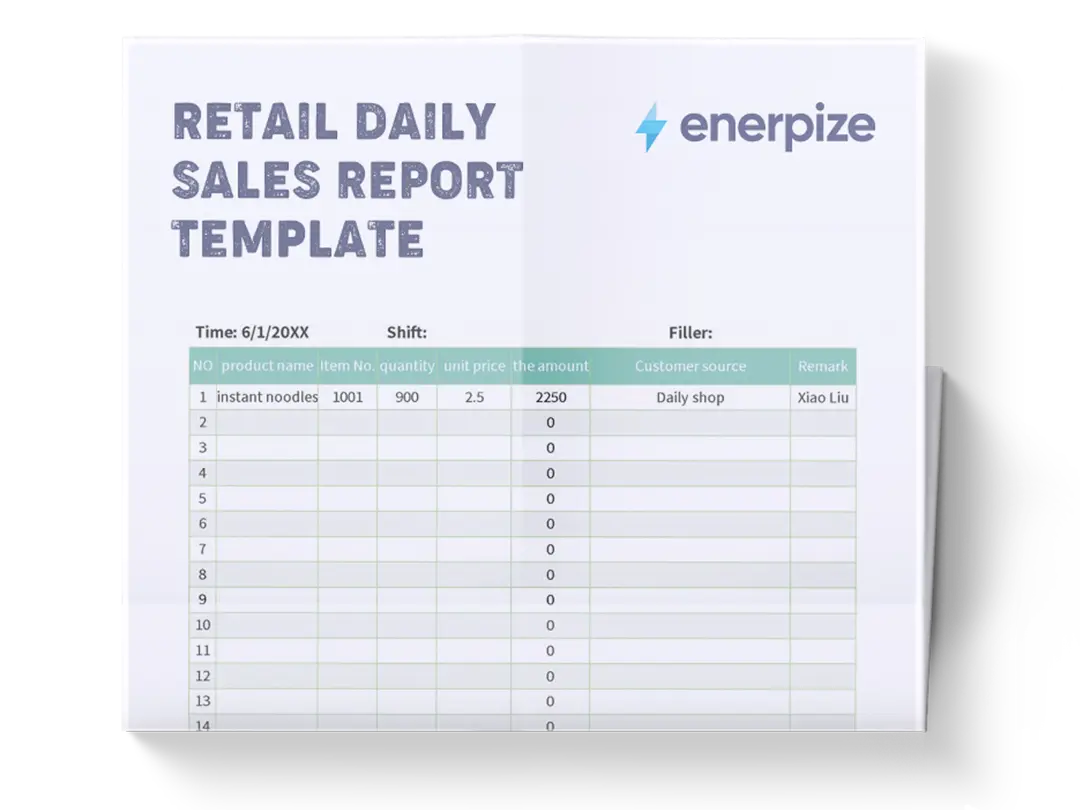
What is the Retail Daily Sales Report Template?
The retail daily sales report template is the one page a store manager reads at closing time to answer three questions. How much did we sell? How did we sell it? And is that good or bad? The first answer is net sales. The second is the split by category, payment method, staff and hour. The third is the comparison with the target and with the same weekday last week.
You will hear it called a DSR, a daily sales sheet, a daily sales record, an end-of-day sales report or a daily sales report format. Same job. One page, every day, the same layout, so Tuesday can be compared with last Tuesday without anyone rebuilding a spreadsheet.
Here is what it is not. It is not your POS Z-report, which is a raw readout of one register. It is not a daily cash report, which proves the money in the drawer matches the cash sales; for that, use our daily cash report template. And it is not an activity log of calls and meetings, which is what a sales team's weekly sales report tracks. The daily sales report sits between them: it turns the till data into decisions.
What Does a Retail Daily Sales Report Template Contain?
Most free daily sales report templates give you a list of transactions and a total at the bottom. That tells you what happened. It does not tell you whether it was a good day. Here is every field our daily sales report template uses, and why.
| Field | Why It Matters |
|---|---|
| Store name, date and day of the week | A Saturday and a Tuesday are different businesses. The weekday decides the target and the comparison. |
| Gross sales | Everything rung up at full price before discounts and returns. |
| Discounts | Promotions and markdowns given away today. If this number climbs, your margin is leaking. |
| Returns and voids | Returns reduce sales. Voids are cancelled before payment and never count, but you list them because they are where cash goes missing. |
| Net sales | Gross sales minus discounts minus returns. The number every other figure is measured against. |
| Tax in sales | VAT, GST or sales tax inside the net figure. It is not your money; it belongs to the tax office. |
| Cost of goods sold and gross profit | What the items you sold cost you, and what is left. Sales without margin is just activity. |
| Transactions (receipts) | How many customers paid. Count receipts, not item lines. |
| Average transaction value and units per transaction | The two levers your staff can actually move on the shop floor. |
| Sales by category | Shows which part of the store carried the day. |
| Sales by payment method | Cash, card, e-wallet, QR, bank transfer. Each total must match its terminal or bank slip. |
| Sales by staff and by hour | Who sold, and when. This is how you set the next roster. |
| Top products | What to reorder before it runs out. |
| Daily target, same day last week, month-to-date pace | The three comparisons that turn a number into a verdict. |
| Expenses paid today and notes | Cash paid out of the business today, plus the context the numbers cannot show: rain, a stockout, a staff absence. |
| Prepared by and reviewed by | Two names, two signatures. Accountability in one line. |
If your current sheet only has one of these comparisons, add the same day last week. Comparing Saturday with Friday tells you nothing. Comparing this Saturday with last Saturday tells you if the business is growing.
What Our Daily Sales Report Template Includes
Before building this one, I went through the daily sales report templates and guides that rank for these searches. Most were a blank table with a total. A few added a chart. Not one of them calculated the average transaction value, checked the day against a target, or told you what share of your sales came through cash. So I built a daily sales report template that does the analysis for you.
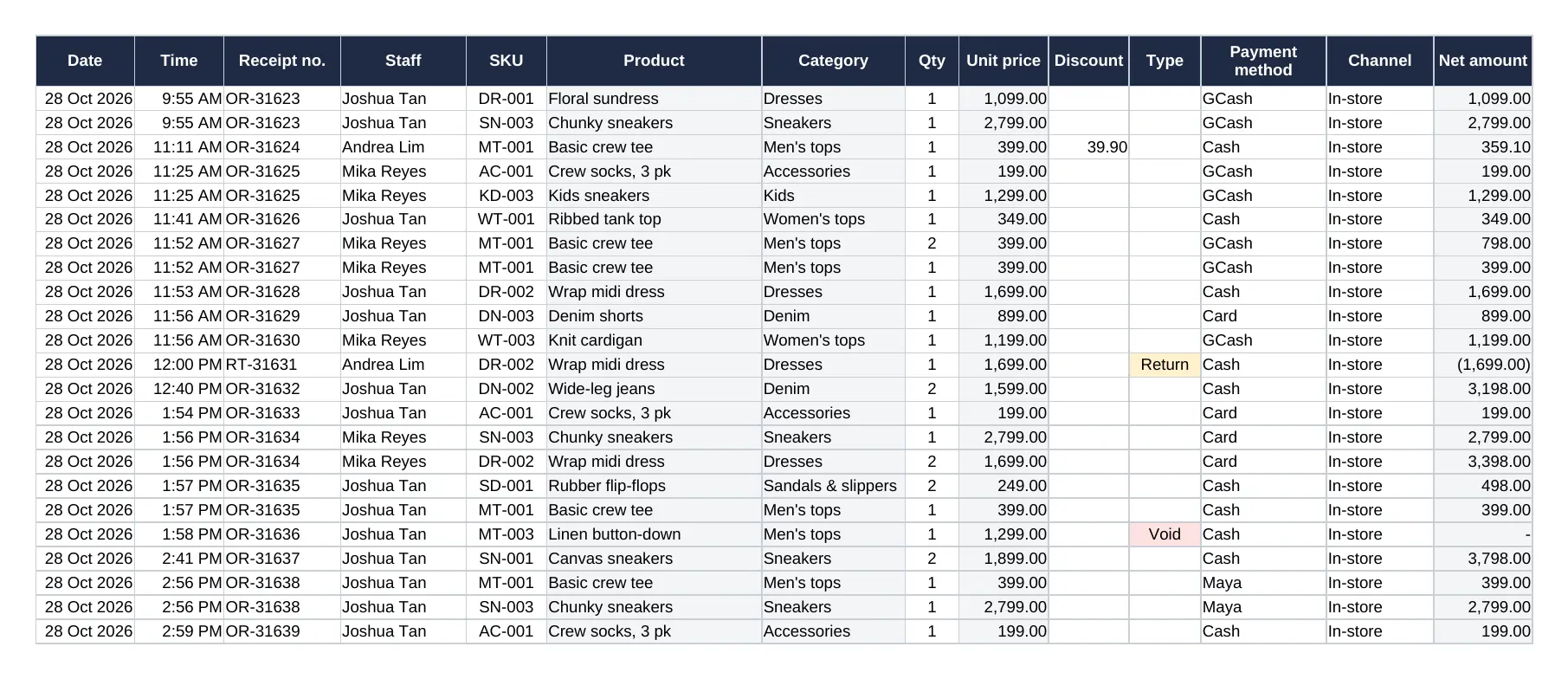
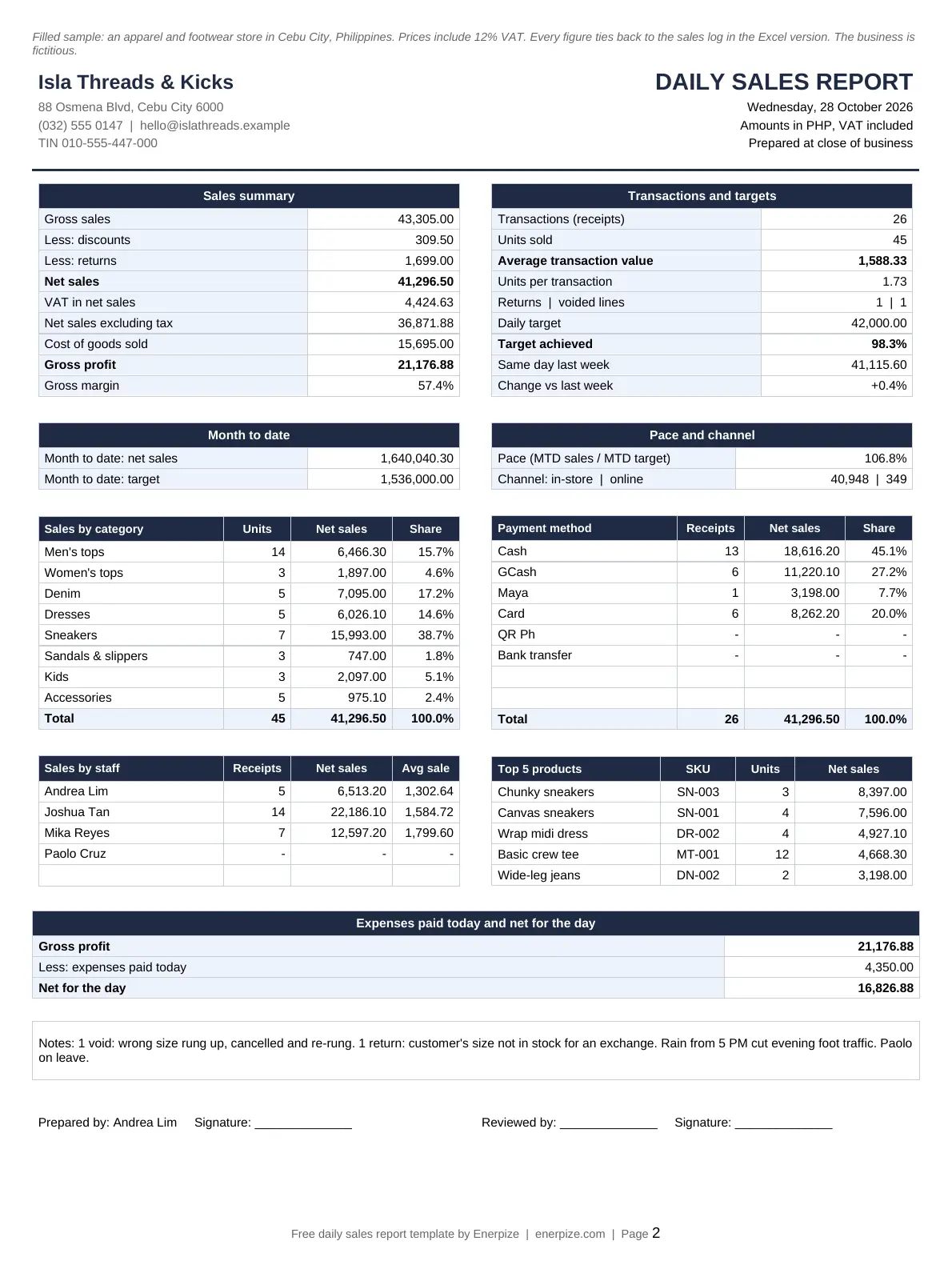
Log once, report automatically. You enter each sale on the Sales Log sheet: time, receipt number, staff, SKU, quantity, discount, payment method and channel. Product name, category, price and cost fill in from the SKU. Then you type a date on the report, and the whole page builds itself for that day. Change the date, and you get any other day of the month. In the sample, Wednesday, 28 October 2026 closes at 41,296.50 net sales from 26 receipts.
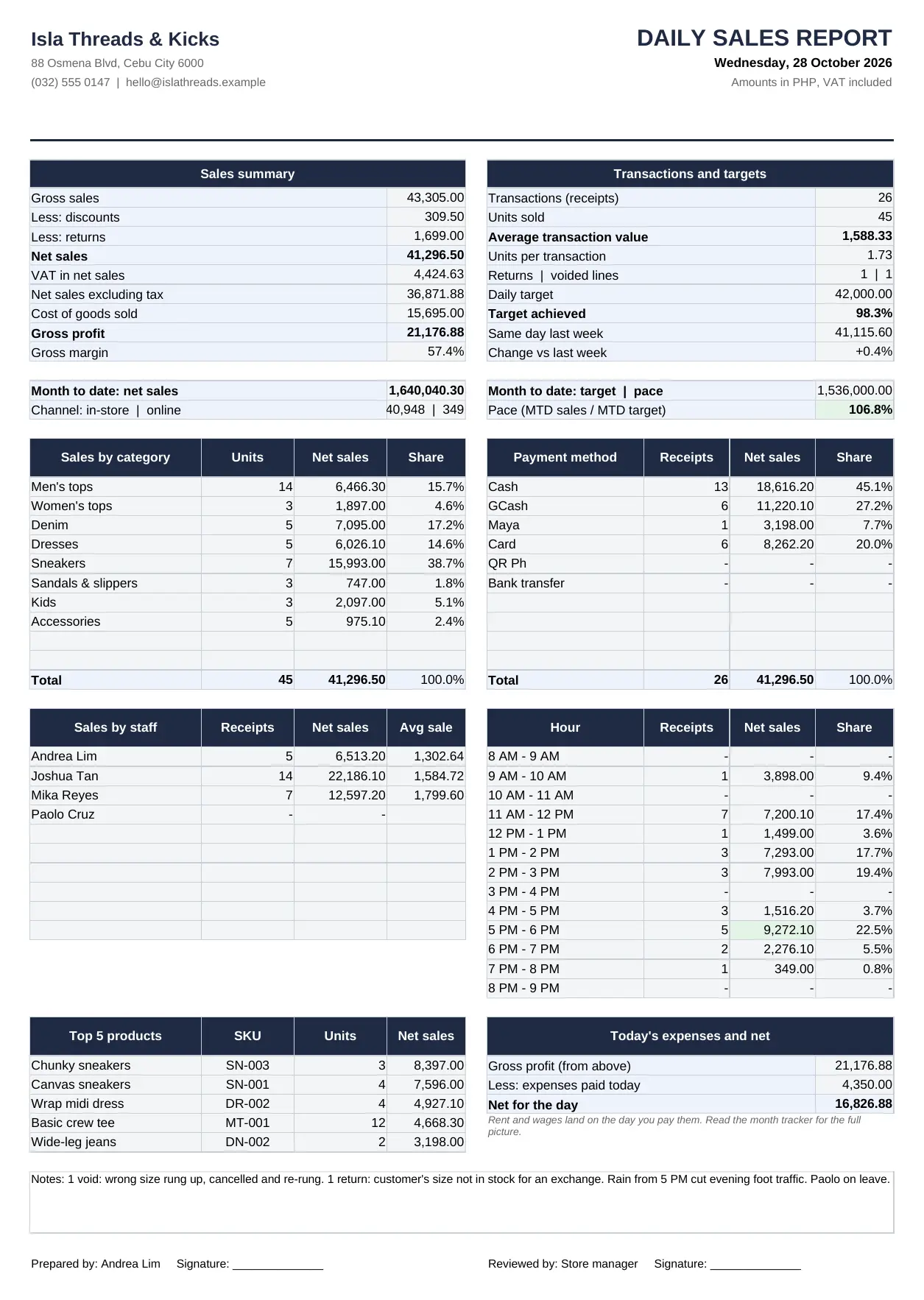
Returns and voids, handled the right way. Mark a line as a return and the template takes it off net sales. Mark it as a void and it stays on the log for the audit trail but never touches your totals. The report counts both separately, because a store with three voids a day has a training problem or a honesty problem, and you want to know which.
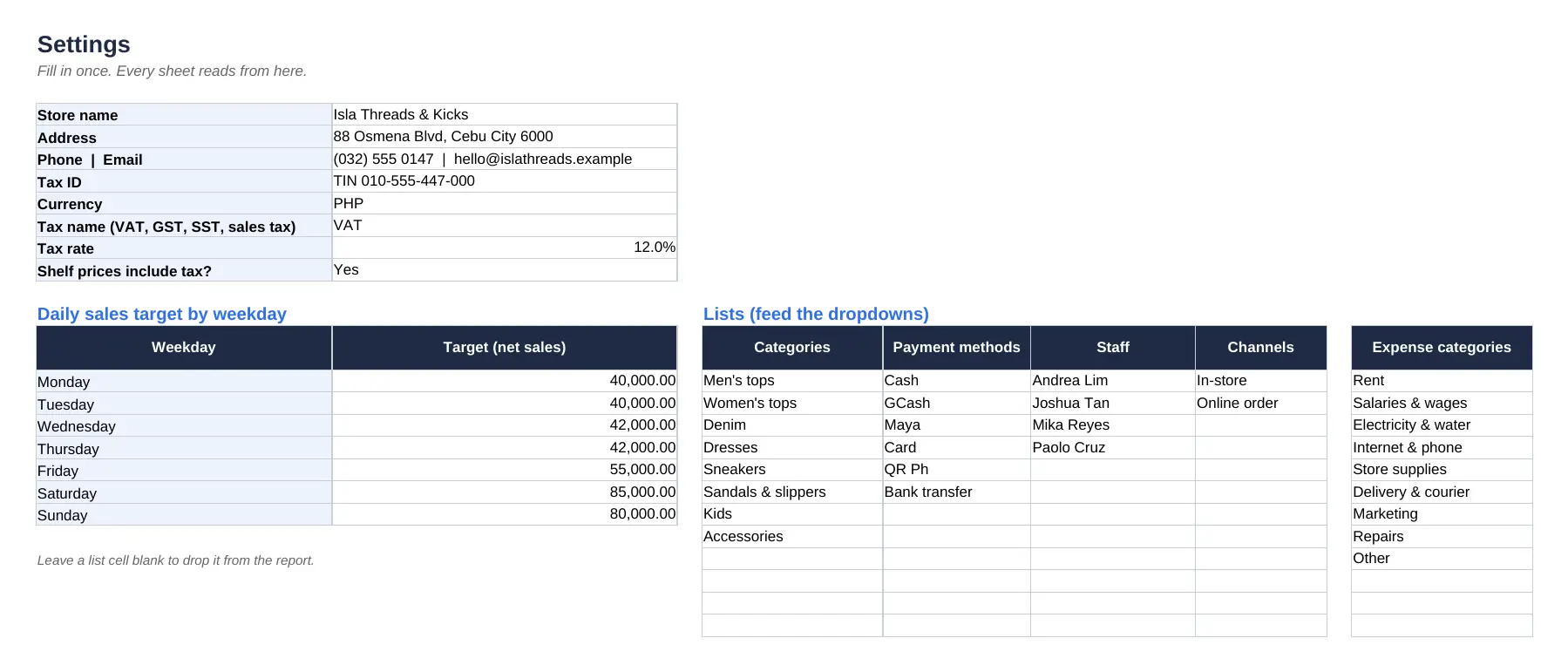
Tax-inclusive or tax-exclusive, your choice. Set your tax name (VAT, GST, SST or sales tax), the rate, and whether your shelf prices include it. The template pulls the tax out of the right side every time, so your gross margin is calculated on sales excluding tax, the way your accountant calculates it.
A target for every weekday. Saturdays should not be judged against a Monday target. Set seven daily targets once on the Settings sheet, and the report shows the target achieved for that day. Categories, payment methods, staff, channels and expense categories live there too, and every dropdown in the file reads from those lists.
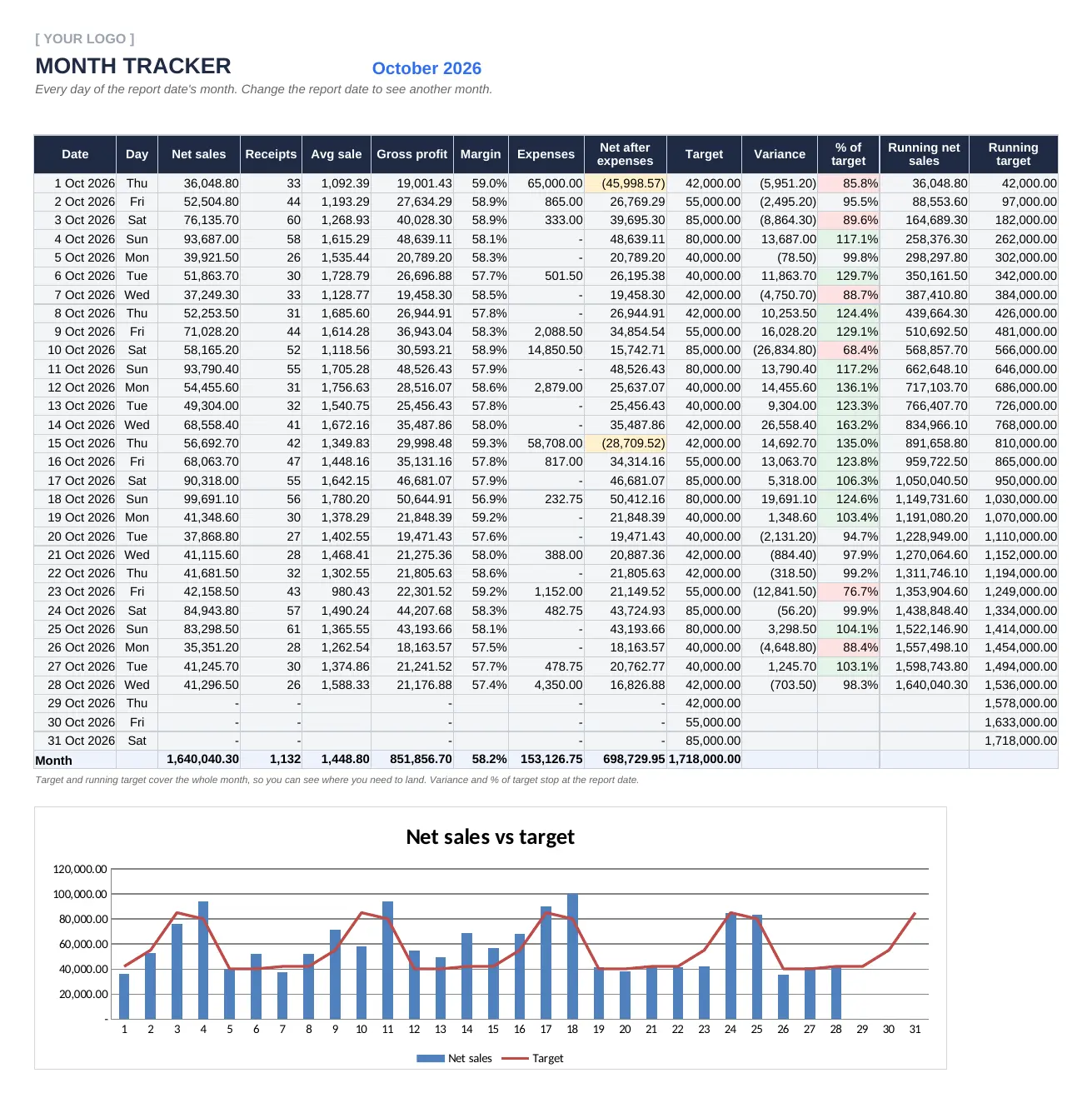
A month tracker that shows the pace, not just the total. Every day of the month gets one row: net sales, receipts, average sale, gross profit, margin, expenses, net after expenses, target and variance. The chart puts daily net sales next to the target line, so the weak days jump out. In the sample, 28 days in, the store is at 1,640,040.30 against a month-to-date target of 1,536,000, a pace of 106.8%.
A Word pack for stores that close on paper. A blank daily sales report you can print, the filled sample, a hotel daily revenue report, a restaurant daily sales report, a fuel station shift sales report, and a cheat sheet with the formulas, a closing checklist and country notes.
Daily Sales Report Example
The fastest way to learn a daily sales report is to read one that is already filled in. So I built a full sample: Isla Threads & Kicks, a fictitious apparel and footwear store in Cebu City, selling in pesos with prices that include 12% VAT.
Make a copy of the filled daily sales report sample in Google Sheets. Here is what is inside:
- A sales log with 28 days of October 2026, one row per item, including returns, voids, discounts and online orders
- 23 products across 8 categories, with selling prices and costs
- Six payment methods (cash, GCash, Maya, card, QR Ph and bank transfer), four staff members and two sales channels
- An expenses log with rent, wages, utilities, courier fees, supplies and ads
- A different sales target for each weekday
- The daily report set to Wednesday, 28 October 2026, and a month tracker with every day so far
Change the date on the report to any other day of the month and the whole page rebuilds. Then delete the sample rows, type your own settings, and the same file becomes your store’s daily sales report.
How to Read the Sample Report
Here is the sample in plain words, so you can see how to read a daily sales report once it is filled in. Isla Threads & Kicks is a fictitious apparel and footwear store in Cebu City. Prices include 12% VAT. The report is for Wednesday, 28 October 2026.
| Line | Amount (PHP) | What It Tells You |
|---|---|---|
| Gross sales | 43,305.00 | Everything rung up at full price. |
| Less: discounts | 309.50 | A 10% promo on a handful of receipts. |
| Less: returns | 1,699.00 | One wrap midi dress, size not in stock for an exchange. |
| Net sales | 41,296.50 | The day's real sales figure. |
| VAT in net sales | 4,424.63 | 41,296.50 x 12 / 112. Not yours to spend. |
| Cost of goods sold | 15,695.00 | What the items sold cost the store. |
| Gross profit | 21,176.88 | A 57.4% gross margin on sales excluding VAT. |
| Transactions | 26 | Average transaction value of 1,588.33, at 1.73 units each. |
| Target achieved | 98.3% | 703.50 short of the 42,000 Wednesday target. |
| Same day last week | 41,115.60 | Up 0.4%, so the miss is about the target, not the trend. |
Now the part a total can never show you. Sneakers brought in 38.7% of the day's sales from just 7 pairs. Cash was still the biggest payment method at 45.1%, with GCash at 27.2% and cards at 20.0%, so the cash count and the GCash statement both need checking before anyone goes home. The best hour was 5 PM to 6 PM, at 9,272.10. Then rain hit, and the last two hours brought in 2,625.10 between them. One salesperson out of three did more than half the receipts.
So what does the manager do with this? Keep the evening shift but move a second person onto the 5 PM peak, reorder the chunky sneakers that topped the product list, and stop worrying about a 98.3% day in a month that is pacing at 106.8%. That is the job of a daily sales report: three decisions in five minutes.
Daily Sales Report Formats by Business Type
The structure stays the same everywhere: sales, how they were paid, how they compare. The lines in the middle change with the business. The Word pack includes a version for each of these.
Retail Store
Net sales, transactions, average transaction value, units per transaction, category split, payment split, staff, hour and top products. That is the Excel template above. For apparel, footwear, electronics or a supermarket, the categories change and nothing else does.
Restaurant and Cafe
Restaurants count covers (guests) as well as checks. The restaurant version splits sales by daypart (breakfast, lunch, dinner) and by order type (dine-in, takeaway, delivery apps), and tracks comps, voids after send, staff meals, tips and labor as a share of sales. Average per cover and average check are the two numbers to watch.
Hotel
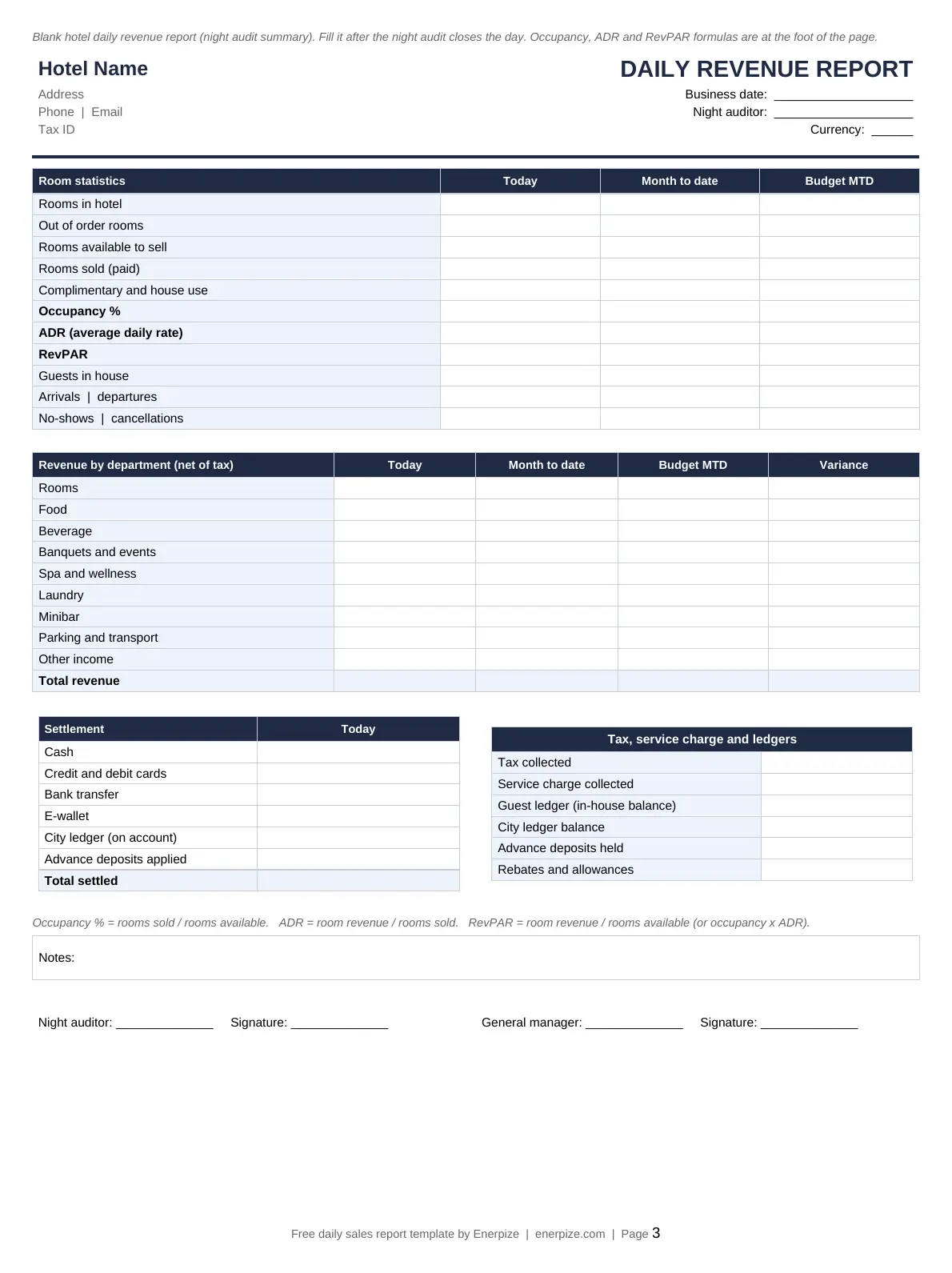
A hotel's daily revenue report comes out of the night audit. Room revenue is measured with occupancy, ADR (average daily rate) and RevPAR (revenue per available room), then the other departments are added: food, beverage, events, spa, laundry and minibar. If you run a property, Enerpize's hotel management page shows how bookings and billing connect.
Fuel Station
Fuel stations report by shift, not by day. Every nozzle gets an opening and closing meter reading, the pump test is deducted, and liters times price gives the fuel sales. Tank dips check the stock, and the cash handover proves the attendant handed in what was sold.
Sales Team and Field Sales Executive
A daily sales report for a salesman or sales executive is a different document. It tracks calls, visits, quotes and orders closed per person, and it is reviewed weekly. Our weekly sales report template is built for that.
Daily Sales Report vs Daily Cash Report vs Weekly Sales Report
These three get mixed up all the time, and stores end up with one sheet trying to do all three jobs badly.
| Report | Question It Answers | Main Numbers | Who Reads It |
|---|---|---|---|
| Daily sales report | How much did we sell today, how, and is it good? | Net sales, transactions, ATV, category, payment, staff, hour, target | Store manager, owner |
| Daily cash report | Does the money we hold match what we sold for cash? | Opening float, cash sales, payouts, deposits, counted cash, over or short | Cashier, manager, bookkeeper |
| Weekly sales report | Is the sales effort turning into revenue? | Calls, meetings, leads, deals closed, revenue vs target | Sales manager, sales reps |
| POS Z-report | What did this register record since the last reset? | Register totals, tax, payment types, voids | Cashier, auditor |
Run the daily sales report and the daily cash report side by side. The cash sales on one must equal the cash sales on the other. When they do not, you find out tonight instead of at month-end. For a forward look, the sales forecast template takes the history these reports build up and projects the next months.
How to Calculate the Numbers on a Daily Sales Report
Every formula here is already in the template. But you should know what each one means before you trust it, so here they are with the sample's figures.
- Net sales = gross sales - discounts - returns. 43,305.00 - 309.50 - 1,699.00 = 41,296.50.
- Tax inside a tax-inclusive price = net sales x rate / (1 + rate). 41,296.50 x 0.12 / 1.12 = 4,424.63. Do not multiply by 12%; that overstates the tax.
- Average transaction value (ATV) = net sales / receipts. 41,296.50 / 26 = 1,588.33.
- Units per transaction (UPT) = units sold / receipts. 45 / 26 = 1.73.
- Gross margin = (net sales excluding tax - cost of goods sold) / net sales excluding tax. (36,871.88 - 15,695.00) / 36,871.88 = 57.4%.
- Target achieved = net sales / daily target. 41,296.50 / 42,000 = 98.3%.
- Pace = month-to-date net sales / month-to-date target. 1,640,040.30 / 1,536,000 = 106.8%.
- Conversion rate = receipts / visitors, if you have a door counter. A busy day with low conversion is a staffing or stock problem, not a traffic problem.
One warning on profit. The "net for the day" line takes gross profit and subtracts expenses paid today. In the sample that is 16,826.88. But rent and wages land on the day you pay them, which is why 1 October shows a loss of 45,998.57 on the month tracker. Read single days for sales. Read the month for profit, or better, your profit and loss statement.
How to Use the Retail Daily Sales Report Template
1- Fill in Settings Once
Add your store name, address, phone, tax ID and currency. Set the tax name, the rate, and whether your prices include tax. Then type your categories, payment methods, staff names, sales channels and expense categories into the lists. Leave a list cell blank to drop it from the report.
2- Set a Target for Each Weekday
Use last year's same month as the base, then add your growth goal. Give the weekend its own targets. If you do not know where to start, take your average net sales for each weekday over the last eight weeks and add 5%.
3- Add Your Products
One row per SKU with name, category, selling price and cost. The cost is what makes the gross profit work, so use your landed cost, not the supplier's list price.
4- Log Every Sale
Enter the date, time, receipt number, staff member, SKU, quantity, any discount, the type (sale, return or void), the payment method and the channel. One row per item line. If your POS exports to CSV or Excel, paste the export into the log instead of typing it.
5- Record Expenses Paid Today
Anything paid out of the business today goes on the Expenses Log with its category and payment method: supplies, courier fees, ads, rent, wages. The report subtracts them to show the net for the day.
6- Pick the Report Date
Type the date on the Daily Sales Report sheet. Every block on the page updates: summary, transactions, target, same day last week, month-to-date, categories, payments, staff, hours, top products and expenses.
7- Reconcile, Then Write One Line of Notes
Match the cash total to the counted drawer, the card total to the terminal settlement, and the e-wallet total to the app. Then write what the numbers cannot say: the weather, a promotion, a stockout, who was absent.
8- Sign, Save and Review the Month
The person who prepared the report and the person who checked it both sign. Save a PDF with the date in the file name, and look at the month tracker every Monday to see if the pace is holding.
Importance of the Retail Daily Sales Report Template
Catches Problems the Same Day
A drop in sales, a jump in returns, or a cash total that does not match the drawer is visible tonight, while the staff on shift still remember what happened. A month-end review finds the same problem four weeks too late.
Turns a Number Into a Verdict
41,296.50 means nothing on its own. 98.3% of target, up 0.4% on last week, in a month pacing at 106.8%, means you had an ordinary Wednesday in a good month. The comparisons are the report.
Sets the Roster and the Reorder
Sales by hour tell you when you need two people on the floor. Top products tell you what to reorder before it runs out. Slow categories tell you what to stop buying, before it ends up on your dead stock report.
Makes Every Shift Accountable
Sales by staff, voids and returns with a name next to them, and two signatures at the bottom. People take more care with a till when they know someone reads the report every night.
Builds the Record Your Tax Return Relies On
Daily reports, filed with the Z-reports and deposit slips, are the trail that backs up your declared sales and the tax you collected. When the tax office asks, you hand over a folder instead of rebuilding a year.
Who Can Use the Retail Daily Sales Report Template?
Store Owners and Managers
The daily read on the business: are we on target, what sold, who sold it, and what needs to change tomorrow. Enerpize's retail store management software page shows the full setup for shops.
Multi-Branch Retailers
One report per branch, same layout everywhere, so head office can line the branches up and see which one is slipping.
Restaurants, Cafes and Bakeries
Use the restaurant version to track covers, average check, dayparts, delivery app sales, comps and labor percentage.
Hotels and Guesthouses
The hotel version follows the night audit: occupancy, ADR, RevPAR and revenue by department.
Fuel Stations
The shift report ties pump meter readings to tank dips and cash, which is where fuel stations lose money without noticing.
Bookkeepers and Accountants
A consistent daily summary makes posting sales, tax and payment splits to the books quick and checkable.
How Enerpize Turns Daily Sales Into an Automatic Report
A spreadsheet works while you have one till and a disciplined manager. The moment you add a second branch or an online channel, typing every sale twice stops being realistic. In Enerpize, the daily sales report is a by-product of selling.
Daily Sales Reports With Filters
Go to Reports, then Sales Reports, then Daily Sales. Switch between a details view and a summary view, and filter by date range, status, client, the staff member who invoiced, currency, branch and custom fields. Change the view to weekly, monthly or yearly, or group it by client or staff. Print it, or export it to Excel, CSV or PDF.
POS Sessions That Close Themselves
Every sale on the Enerpize POS lands in the reports the moment it is paid. At the end of a shift, the cashier closes the session and enters the counted cash, so the drawer is checked against the system, not against a sheet someone typed. The POS mobile app does the same from a phone or tablet.
Product, Payment and Profit Reports
Product sales reports run daily, weekly, monthly or yearly, by category, brand, item or client. Payment reports split collections by method and by staff. The item sales profit report shows margin by product, and tax reports show what you collected. Every invoice is also a stock movement, so your inventory stays right without a separate count sheet. For one-off invoices, the free invoice maker is a quick start.
Daily Sales Report Rules by Country
A daily sales report is a management document, not a tax form. But it sits right next to the records the tax office does ask for, so it should line up with them. Here is what matters in the four countries where this template gets the most use.
United States
The IRS expects you to keep supporting documents for your gross receipts. Its list of records to keep names cash register tapes, deposit information for cash and credit sales, receipt books, invoices and Forms 1099-MISC. Your daily sales report ties those together. Sales tax is set by each state, and many add local rates on top.
What to add for US stores:
- Sales tax collected as its own line, split by jurisdiction if you sell in more than one
- Exempt sales (resale certificates, exempt items) shown separately from taxable sales
- The Z-report number for each register, so the report can be traced to the tape
Practical note for US retailers: keep the daily reports with the register tapes and bank deposit slips for at least three years, the IRS's general period for keeping records that support a return.
Philippines
Under the Ease of Paying Taxes Act, the invoice became the primary document for sales of goods and services, and the official receipt stopped being the main proof of a sale for services. The invoicing requirements took effect on April 27, 2024. VAT is 12%, and most retail shelf prices include it.
What to add for Philippine stores:
- Set the template to VAT, 12%, prices include tax
- Add the first and last invoice number of the day, so the report covers an unbroken series
- Split payments into cash, GCash, Maya, card and QR Ph, the way the sample does
Practical note for Philippine retailers: e-wallets now take a big share of payments, so match the GCash and Maya totals to the merchant statements every day, not at month-end.
India
GST applies to retail sales, and the rate depends on the item. E-invoicing is required for B2B invoices of businesses whose aggregate turnover exceeds Rs 5 crore, a threshold the CBIC set with effect from 1 August 2023. Sales to walk-in consumers are not e-invoiced, but they still go into your GST returns.
What to add for Indian stores:
- Sales split by GST rate, because your returns need them that way
- B2B sales with GSTIN separated from B2C sales
- UPI as its own payment method; it is usually the biggest line after cash
Practical note for Indian retailers: for small B2C sales where the customer does not ask for an invoice, the GST rules allow one consolidated tax invoice at the close of each day. Your daily sales report is the natural place to total it.
Malaysia
LHDN has phased in e-invoicing by annual turnover, starting with businesses above RM100 million on 1 August 2024 and reaching businesses up to RM5 million on 1 January 2026. The LHDN implementation timeline exempts taxpayers with annual turnover below RM3 million.
What to add for Malaysian stores:
- A count of sales where the customer asked for their own e-invoice
- A monthly total of all other consumer sales, ready for the consolidated e-invoice
- A flag on any single sale above RM10,000, which needs its own e-invoice
Practical note for Malaysian retailers: the consolidated e-invoice for consumer sales is issued within 7 days after the month ends, so the month tracker's total is exactly the number you need.
Key Takeaways
- A daily sales report answers three questions: how much you sold, how you sold it, and whether that is good.
- Net sales are gross sales minus discounts and returns. Voids never count.
- Count receipts, not item lines, or your average transaction value will be wrong.
- Pull tax out of a tax-inclusive price with rate / (1 + rate), not by multiplying by the rate.
- Compare each day with its own weekday target and with the same day last week.
- Read single days for sales, and the month for profit.
- Our free daily sales report template builds the whole report from a sales log, in Excel and Google Sheets, with Word versions for retail, hotels, restaurants and fuel stations.
FAQs
What is a daily sales report?
A daily sales report is a one-page summary of a business's sales for one day. It shows gross sales, discounts, returns, net sales, tax, transactions and payment methods, then compares the result with the daily target and with the same day last week.
How do I make a daily sales report in Excel?
Log every sale in one sheet with date, receipt, staff, item, quantity, price, discount and payment method. Build a summary sheet that totals the log for one date with SUMIFS and COUNTIFS. Or download our daily sales report template, which already does both.
What should a daily sales report include?
At minimum: date, gross sales, discounts, returns, net sales, tax, number of transactions, average transaction value, sales by payment method and sales by category. Add the daily target, the same day last week, staff and hourly sales once the basics are in place.
How do you calculate daily sales?
Add up everything sold at full price, then subtract discounts and returns. That is net sales. If your prices include tax, take the tax out with net sales x rate / (1 + rate) to get sales excluding tax.
How do I calculate average transaction value?
Divide net sales by the number of receipts. 41,296.50 in net sales over 26 receipts gives an average transaction value of 1,588.33. Count receipts, not item lines.
What is the difference between a daily sales report and a daily cash report?
The daily sales report covers all sales, however they were paid, and analyzes them. The daily cash report covers only cash: opening float, cash sales, payouts, deposits and the counted drawer. The cash sales figure must be the same on both.
How do I write a daily sales report for a sales executive?
List the calls, visits, quotes sent and orders closed that day, with the value of each order and the next step for open deals. Keep the same columns every day so the manager can roll them up into a weekly report.
Should a daily sales report include tax?
Show it, but separately. Report net sales as customers paid them, then the tax inside that figure, then sales excluding tax. Measure gross margin on sales excluding tax.
Can I use the daily sales report template in Google Sheets?
Yes. Open the Google Sheets link on this page and make a copy. The formulas, dropdowns and month tracker work the same way as in Excel.
How do I track daily sales against a target?
Set a target for each weekday, divide each day's net sales by that day's target, and track month-to-date sales against month-to-date target. Above 100% pace means you are ahead of the month.
About the Author
Omar El Bahr is a Senior Digital Growth Specialist at Enerpize, where he leads SEO, content strategy, and organic growth across international markets. He is a Forbes Communications Council contributor and has written for Entrepreneur on business communication and digital strategy.
Disclaimer
This daily sales report template and guide are for general business use and are not accounting or tax advice. The sample business is fictitious. Tax, invoicing and record-keeping rules change and vary by country, so confirm them with the relevant authority or a qualified professional.