Posted on 31 August 2025
Free Sales Plan Template in Excel, Google Sheets, Word and PDF
- Sets monthly sales targets by product from last year’s sales, with a separate growth rate for each product line
- Tracks actual sales against target by month, product and rep, and shows how much you still need each month
- Splits each month into weekly targets by working days, with the deals and opportunities needed
- Available to download for free in Excel, Google Sheets, Word and PDF formats
A sales plan template is a spreadsheet that turns an annual sales goal into monthly targets by product and salesperson, based on last year’s sales. Each month you enter actual sales, and it shows achievement against target, the gap still to close and the monthly pace needed to finish the year on target.


Last updated: November 15, 2026
What it is
A sales plan template that sets monthly sales targets by product from last year's sales, then tracks actual sales against them by month, by product and by rep.
When you need it
When the yearly number lives in someone's head, or when you only find out in December that March went wrong. It works as a monthly sales plan in Excel or Google Sheets.
What's inside
Settings, last year, the plan, actuals, a tracker, rep targets, a weekly plan, a weekly log and a one-page printable plan.
Formats
Free download in Excel, Google Sheets, Word and PDF. Excel and Google Sheets calculate. Word and PDF hold the written plan.
Want to see it filled in first?
Make your own copy of the filled sample in Google Sheets.
What Is the Sales Plan Template?
January: "We'll grow 10% this year." December: "What happened?"
Between those two sentences sit eleven months nobody measured.
A sales plan template is a spreadsheet that turns an annual sales goal into monthly targets by product, period and salesperson, based on last year's sales. You enter actual sales each month, and it shows achievement against target, the gap still to close and the monthly pace needed to finish the year on target.
People call it different things. A sales goal sheet. A sales goals worksheet. A sales target template. A monthly sales plan. They all point at the same job: one number, broken down until each person knows their share of it.
by month
by product
by month and rep
at month end
what's still needed
What it isn't: a forecast or a strategy deck. A forecast predicts what will happen. A plan says what you've decided should happen, then checks it every month.
Sales Plan vs Sales Forecast vs Sales Budget vs Sales Goal Sheet
These four documents get mixed up all the time. Each answers a different question.
| Document | The question it answers | Built from | Who uses it |
|---|---|---|---|
| Sales plan | What will we sell, when, and who sells it? | Last year plus a growth decision | Owner, sales manager, reps |
| Sales forecast | What are we likely to sell? | History, pipeline and trends | Finance and management |
| Sales budget | What will it cost to sell it? | The plan plus costs | Finance |
| Sales goal sheet | What is my number this month or week? | The plan, split by person | Each rep |
| Sales report | What did we actually sell? | Invoices | Everyone, looking back |
A forecast tells you where you're heading. A sales plan tells you where you decided to go, and how far off course you are.
If you need the prediction side, the sales forecast template does that job. Both work best side by side.
Which Sales Plan Sheet Fits Your Situation?
Start with the question you need answered this week.
| If your situation is... | Use this | Where to find it |
|---|---|---|
| You need yearly targets by product or service | Monthly targets from last year | Plan sheet |
| You want to know if you're ahead or behind | Achievement to date and pace | Tracker sheet |
| You manage reps with their own numbers | Targets from each rep's share | Reps sheet |
| You plan week by week | A weekly sales plan split by working days | Weekly Plan and Weekly Log sheets |
| You need a written plan for a partner or the bank | A two-page sales plan in Word | Word and PDF files |
| You report what sold last week | A weekly sales report | A separate download |
| You pay commission on the results | A commission sheet | A separate download |
What Does a Sales Plan Template Contain?
Every sales plan template Excel file needs these fields. Leave one out and the numbers stop meaning anything.
| Field | What goes in it | Why it matters |
|---|---|---|
| Financial year start | The month your year begins | A July year and a January year have different Q1s |
| Products or services | Each line you sell, up to 15 | Targets by line show which one drags |
| Last year by month | Actual sales without tax | Sets the shape of the year |
| Growth | A company rate, with optional rates per product | Not every line grows at the same speed |
| Monthly targets | Calculated from last year and growth | The number each month is measured against |
| Actuals | Sales entered at each month end | Without them, a plan is a wish |
| Rep shares | Each person's percentage of the target | Turns one number into personal sales targets |
| Achievement and status | Actual divided by target, with a color | Shows trouble in the month it happens |
The field that matters most is last year by month. It carries your seasonality. Skip it, divide the year by 12, and a slow month looks like a disaster while a busy one looks like a win.
What the Enerpize Sales Plan Template Includes
The old sales plan template did one thing: last year, this year's goal, and the change between them. That stayed, and the Plan sheet is still a monthly sales plan for the whole year. What's new is everything after January, so the plan keeps working all year. It runs on formulas only, with no macros, and yellow cells are the only ones you type in.
A Calendar That Starts When Your Year Does
Pick your first month in Settings, and all 12 columns reorder themselves. An April year in India and a July year in Australia read the right way round, with the right Q1.
Targets Shaped Like Last Year
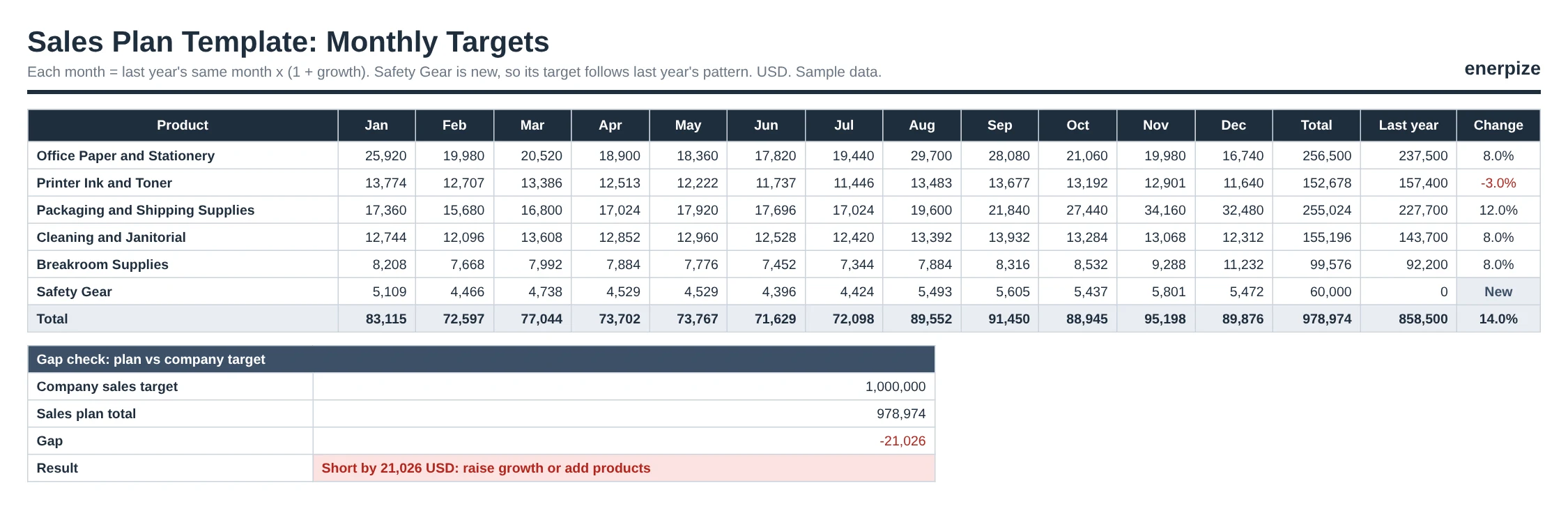
Each monthly target is last year's same month times one plus growth. Your August spike stays an August spike. Set a different growth rate for any product: in our sample, packaging grows 12% while ink and toner plans for a 3% drop.
The Number You Still Need
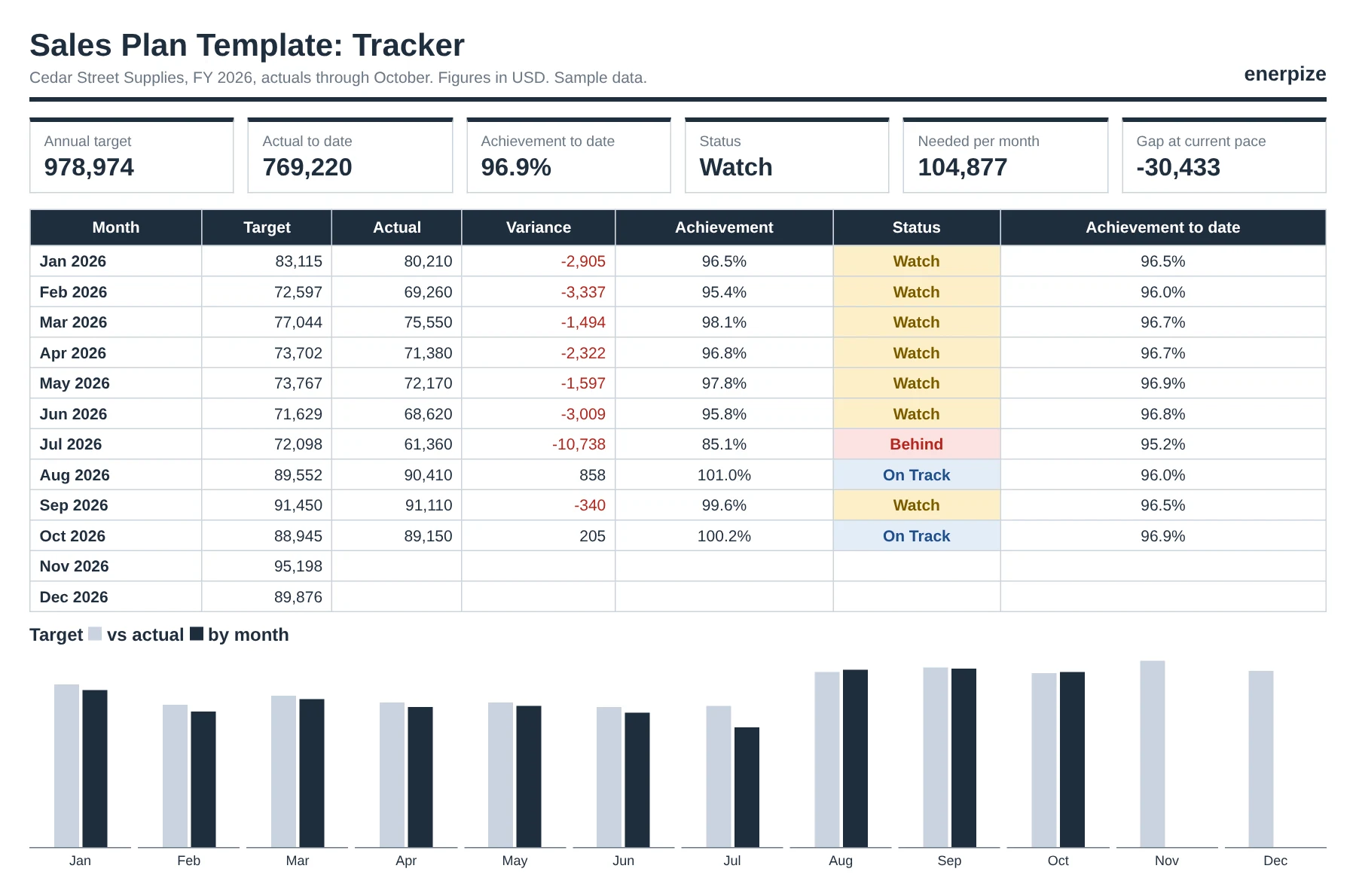
The Tracker compares actual sales with the target for closed months only. Then it answers the question that matters in October: how much do we need each month from here? It also projects the year end at your current pace.
New Products Without #DIV/0!
A product with no history gets an annual target, spread across the year in the same pattern as last year's total sales. Its change shows New instead of an error. Our sample's Safety Gear line launched this year with a 60,000 target.
Shares That Must Add Up
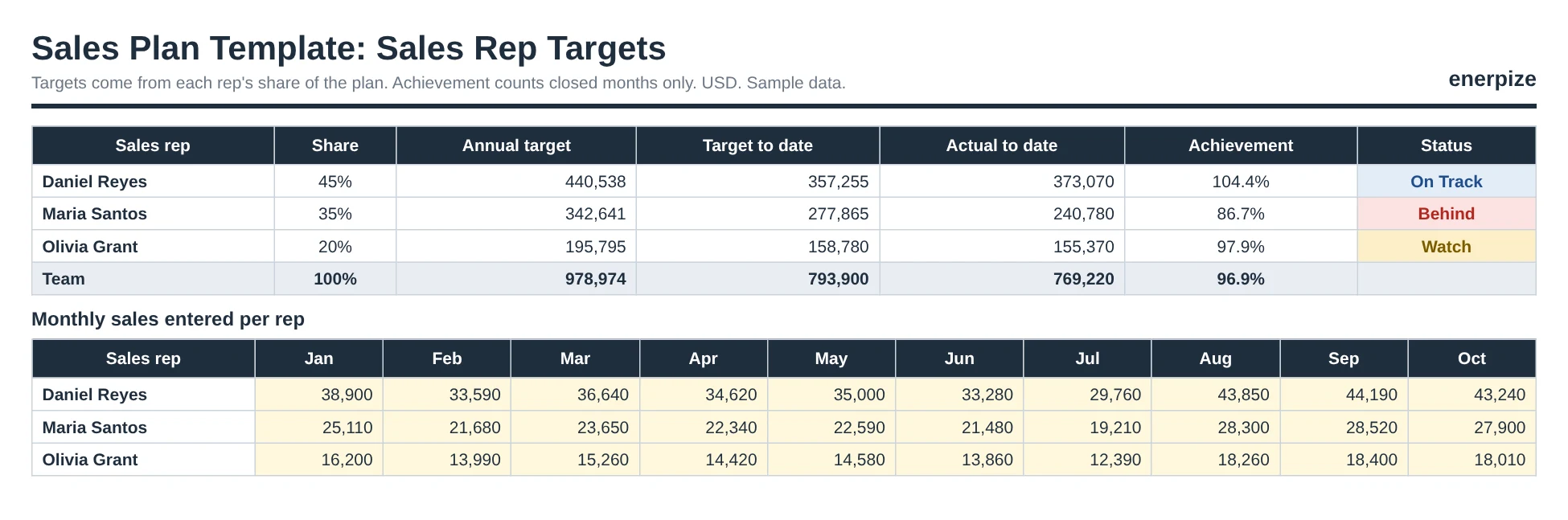
Give each rep a share of the target. The Reps sheet turns it into an annual target and a target to date, and warns you if the shares don't total 100%.
A Target for Every Week
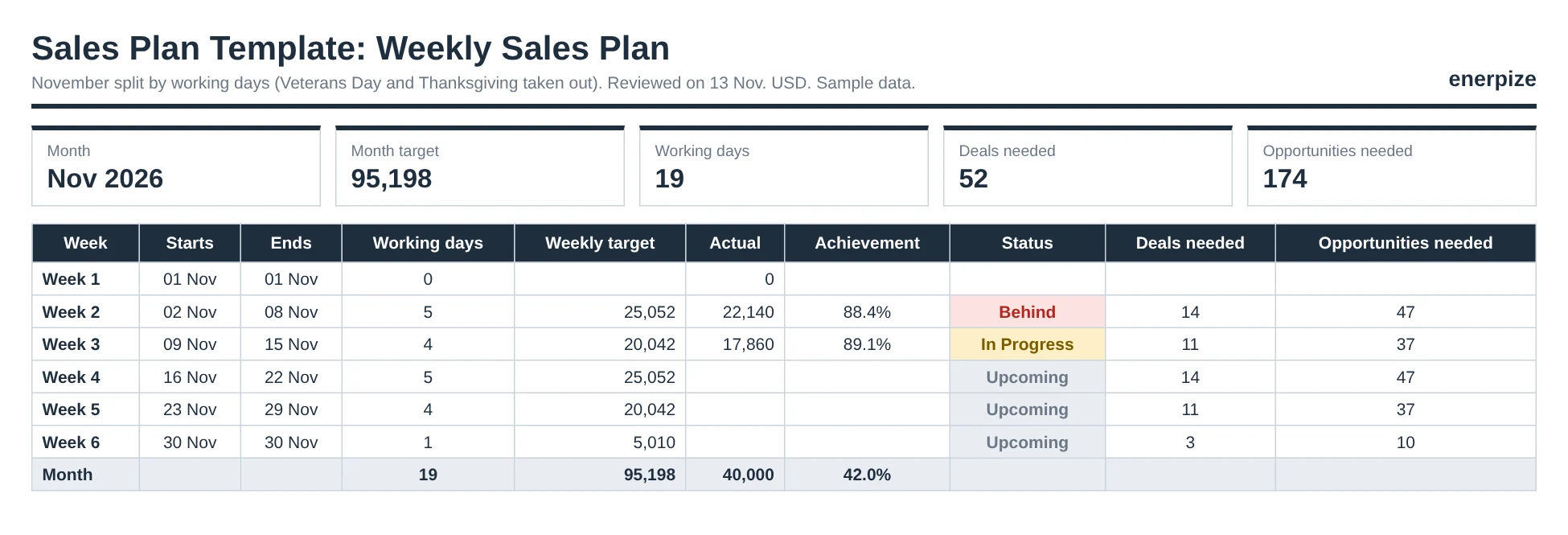
Pick a month, and its target splits across the weeks by working days, minus public holidays. A week with Thanksgiving in it gets a smaller target, not a guilt trip. That's your weekly sales plan, built from the yearly one.
From Revenue to Conversations
Add your average deal value and win rate, and every weekly target turns into deals needed and opportunities needed. A revenue number nobody can act on becomes a number of calls somebody can make.
Sales Plan Status Colors and the Gap Check
Every color means one thing. You set the levels in Settings.
| Status | What it means | What to do |
|---|---|---|
| On Track | Achievement at or above 100% | Keep going |
| Watch | Between 90% and 99.9% | Find the line that slipped |
| Behind | Below 90% | Talk about it this month, not in December |
| New | No sales last year | Judge it on its own target |
| In Progress | This week isn't over yet | Read it on Monday |
| Upcoming | A week that hasn't started | Plan the calls now |
The gap check sits under the plan. It adds up every product target and compares the total with your top-down company target. In the sample, the plan totals 978,974 against a company target of 1,000,000.
1,000,000
978,974
21,026 short
So what? Somebody promised a million. The products only add up to 978,974. Better to find that in January than in December.
Sample Sales Plan: A Filled Example
Want to see a sales plan example working before you type anything? Make your own copy of the filled sample in Google Sheets. It follows a fictional wholesaler, Cedar Street Supplies, with 6 product lines, 3 reps and actual sales from January to October 2026. The screens on this page use the same sample data.
How to Read the Sample
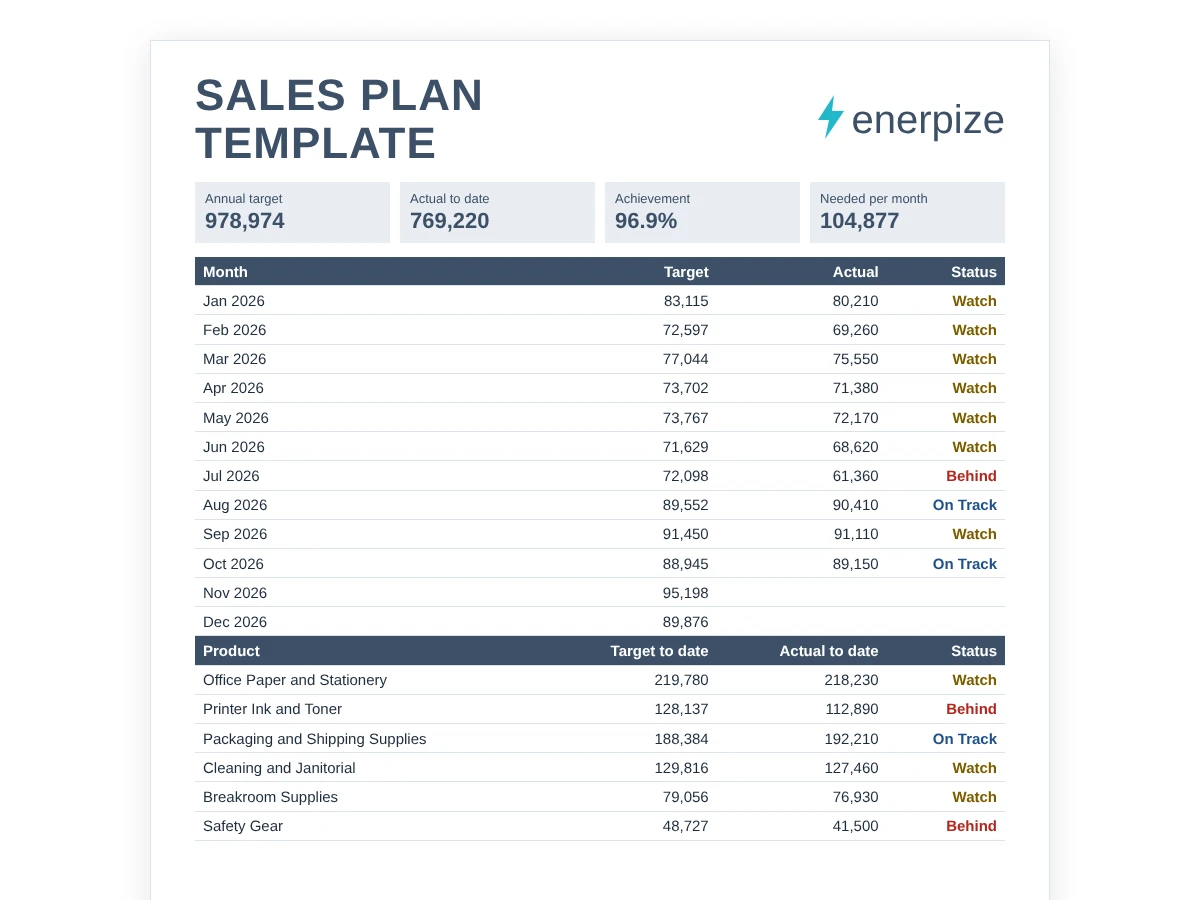
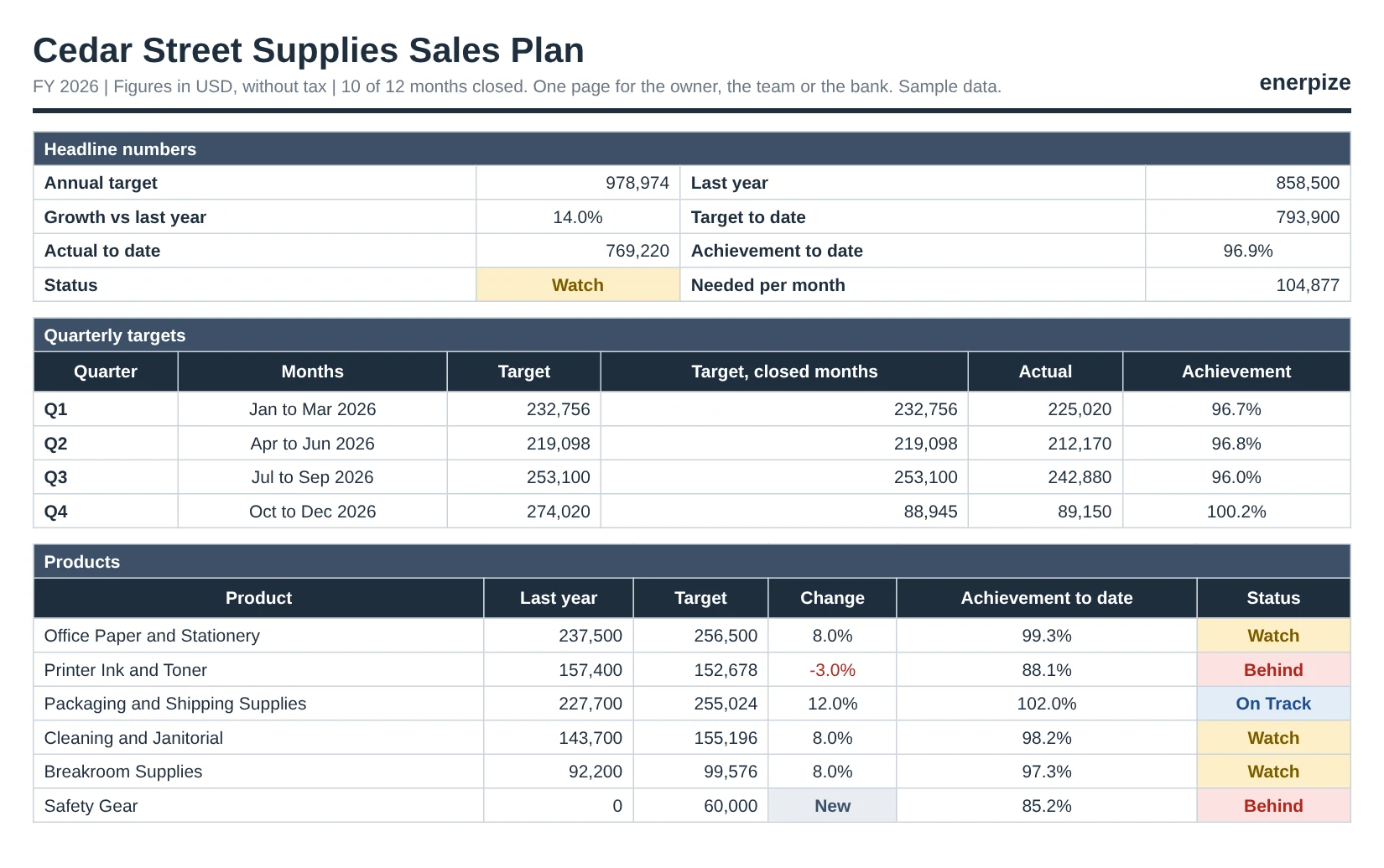
This sample sales plan works like your own will. Start on the Tracker. Last year's sales were 858,500. The plan is 978,974, up 14.0%. After 10 months, actual sales are 769,220 against a target to date of 793,900.
96.9%
Watch
209,754
104,877
Close, but not on track. Look down the months and July stands out at 85.1%. Look down the products and two lines are Behind: ink and toner at 88.1%, and the new Safety Gear line at 85.2%. Packaging, at 102.0%, is carrying the year.
Then open Reps. Daniel Reyes is at 104.4%. Maria Santos is at 86.7%. Same products, same months, different story. That's the coaching conversation.
Sales Plan Template Excel Formulas
Every formula is built into the sales plan template Excel file, and works the same in Google Sheets. Here's what each one does, with a number from the sample.
Monthly Target
Monthly Target = Last Year's Same Month x (1 + Growth)
Office paper sold 24,000 last January. At 8% growth, this January's target is 25,920. Repeat it for 12 months and you have a monthly sales plan.
New Product Target
Monthly Target = Annual Target x Month's Share of Last Year's Total Sales
January carried 8.5% of last year's sales, so Safety Gear's January target is 5,109 of its 60,000.
Achievement to Date
Achievement to Date = Actual to Date / Target for Closed Months
769,220 / 793,900 = 96.9%. Measure it against the full year instead and you'd get 78.6%, which looks like a crisis in October.
Needed per Month
Needed per Month = (Annual Target - Actual to Date) / Months Left
(978,974 - 769,220) / 2 = 104,877. The plan only asked for 92,537 a month for November and December. That 13% lift is the real size of the problem.
Weekly Target and Deals Needed
Weekly Target = Month Target x Working Days in the Week / Working Days in the Month
November's target is 95,198 over 19 working days. A 5 day week gets 25,052. At an average deal of 1,850, that's 14 deals. At a 30% win rate, 47 opportunities.
How to Use the Sales Plan Template
Download the sales plan template Excel file, or make a Google Sheets copy. One hour to set up. Ten minutes at each month end after that.
1- Fill In Settings
Enter your company, currency, the month your year starts, the year and your growth target. List products, reps with their shares, and public holidays. Every other sheet reads from here.
⚡ Tip: Not sure about growth? Start with last year's actual growth, then argue for anything higher. Prefer paper? Write the plan in the Word or PDF file and keep the numbers in Excel.
2- Enter Last Year by Month
Type last year's sales for each product and month, without sales tax, VAT or GST. If a product is new, leave its row blank and give it an annual target in Settings.
⚡ Tip: Pull these from your accounts, not memory. One wrong month bends the whole year.
3- Review the Plan
Targets fill in by themselves. Read the totals, the change by product and the gap check. If the plan falls short of the company target, change growth or add a product now.
⚡ Tip: Look at each month's change, not just the year. A 30% jump in one month needs a reason.
4- Set Rep Shares
Give each rep a share of the target in Settings, adding up to 100%. Their annual and to-date targets appear on the Reps sheet.
⚡ Tip: Base shares on accounts or territory, not seniority.
5- Enter Actuals at Month End
Type each product's actual sales once the month closes, and each rep's total on Reps. The month counts as closed as soon as any actual is entered.
⚡ Tip: Rep totals should add up to the Actuals total. If they don't, someone's sales are missing.
6- Check the Tracker
Read achievement to date, status and needed per month. Then find the month, product or rep marked Behind.
⚡ Tip: Bring the Tracker to your monthly sales meeting. One screen, one conversation.
7- Plan the Week
Pick the month on Weekly Plan. Log sales on Weekly Log as they come in, and read the week's achievement every Monday.
⚡ Tip: Use the deals and opportunities numbers to set call targets for the week.
Common Sales Plan Mistakes
Most sales plans don't fail loudly. They just stop being opened after February.
✕ Dividing the year by 12
Why it matters: Seasonal months look like wins and slow months look like failures.
Fix: Shape each month on last year's same month.
✕ Measuring progress against the full year
Why it matters: By June you're at 50% and everyone panics for no reason.
Fix: Compare actuals with the target for closed months only.
✕ Mixing figures with and without tax
Why it matters: Growth looks 10% or 20% higher than it is.
Fix: Enter both years without sales tax, VAT or GST.
✕ Rep shares that don't add up
Why it matters: Targets total more or less than the plan.
Fix: Keep shares at exactly 100%. The sheet warns you.
✕ No plan for new products
Why it matters: The line either has no target or breaks the formula.
Fix: Give it an annual target spread like last year.
✕ Moving the target mid-year
Why it matters: Every month gets measured against a different promise.
Fix: Keep the target. Track the gap and the pace instead.
Why a Sales Plan Matters
Are most sales teams hitting their numbers? No. Xactly's 2025 Sales Compensation Report found that 87% of sales teams struggle to meet or exceed their quota targets. RepVue's Cloud Sales Index put quota attainment among software sellers at just above 43% in Q3 2025, its highest level since Q2 2023.
So what? A plan can't make a weak market strong. But it can make sure you find out in March, while there are still nine months to fix it.
It Turns One Number Into Twelve
"Grow 14%" is hard to act on. "Sell 25,920 of office paper in January" isn't.
It Shows Trouble in the Month It Happens
Our sample's July came in at 85.1%. Spotted in August, that's a recovery plan. Spotted in December, it's an excuse.
It Gives Every Rep a Number They Own
A shared target belongs to nobody. A 35% share of 978,974 belongs to Maria.
Sales Plan Spreadsheet vs Sales Software
| What you need | Sales plan template | Enerpize |
|---|---|---|
| Cost | Free | Free trial, then a paid plan |
| Setting the yearly plan by product | Built in, from last year | Keep this in the template |
| Actual sales | Typed at month end | Counted from invoices as they're issued |
| Tax in the numbers | You remember to exclude it | Net of discounts and VAT |
| Refunds and credit notes | Adjusted by hand | Deducted while the period is open |
| Commission | Worked out separately | Fixed or tiered, from the same target |
Many teams use both: the template to decide the year, and software to count it.
How Enerpize Handles Sales Targets and Commissions
Who types the actuals into your sales plan every month? And what happens when a refund lands after they do? Enerpize's sales target and commission management software counts sales against each rep's target from the invoices themselves. The screens below use sample data.
Commission Rules: The Target Behind the Number
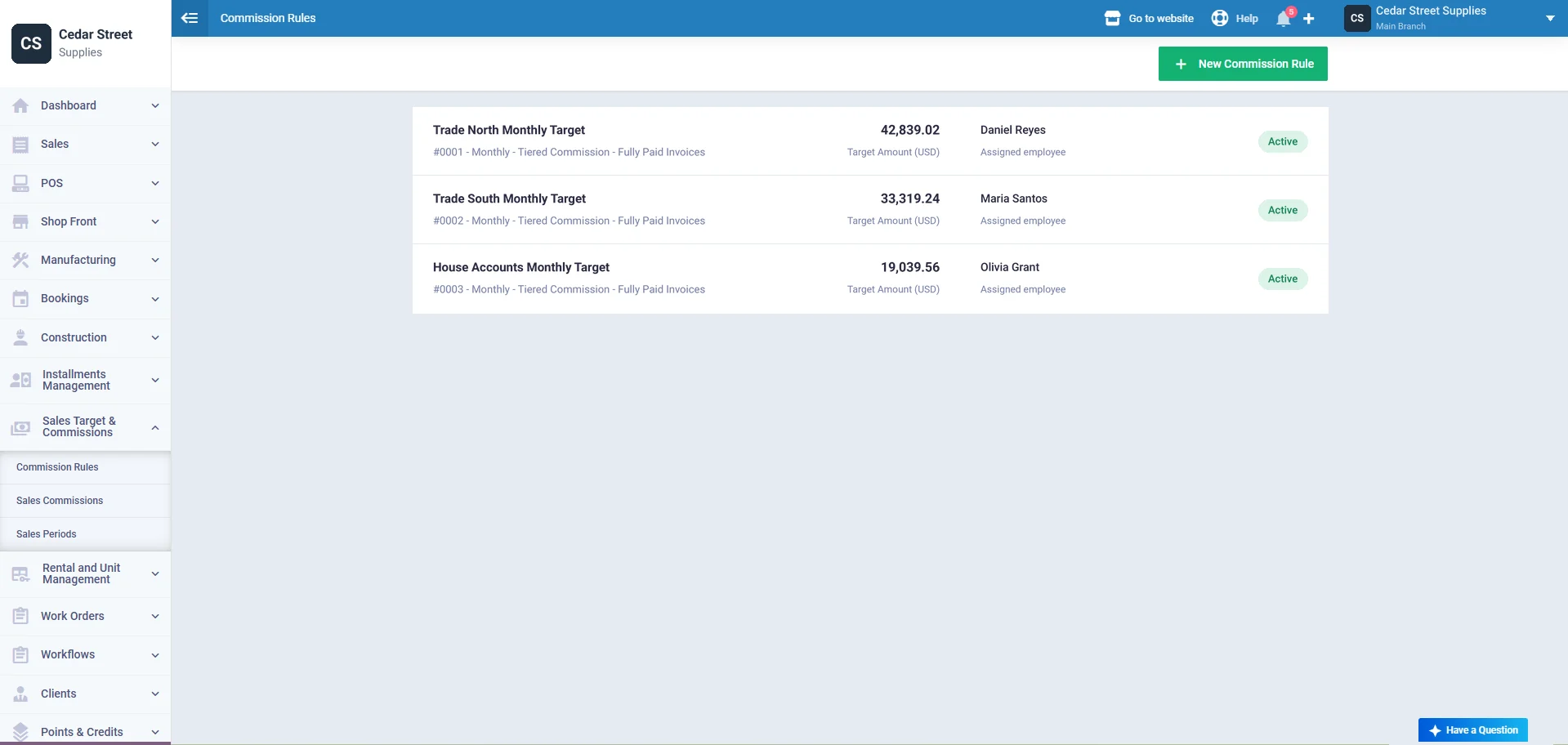
A commission rule sets the period (monthly, quarterly or annually), the target as an amount or a quantity, and how commission is worked out. Fixed commission pays on each qualifying invoice. Tiered commission pays by how much of the target was reached, with up to 20 tiers. Assign a rule to employees, roles, departments or branches.
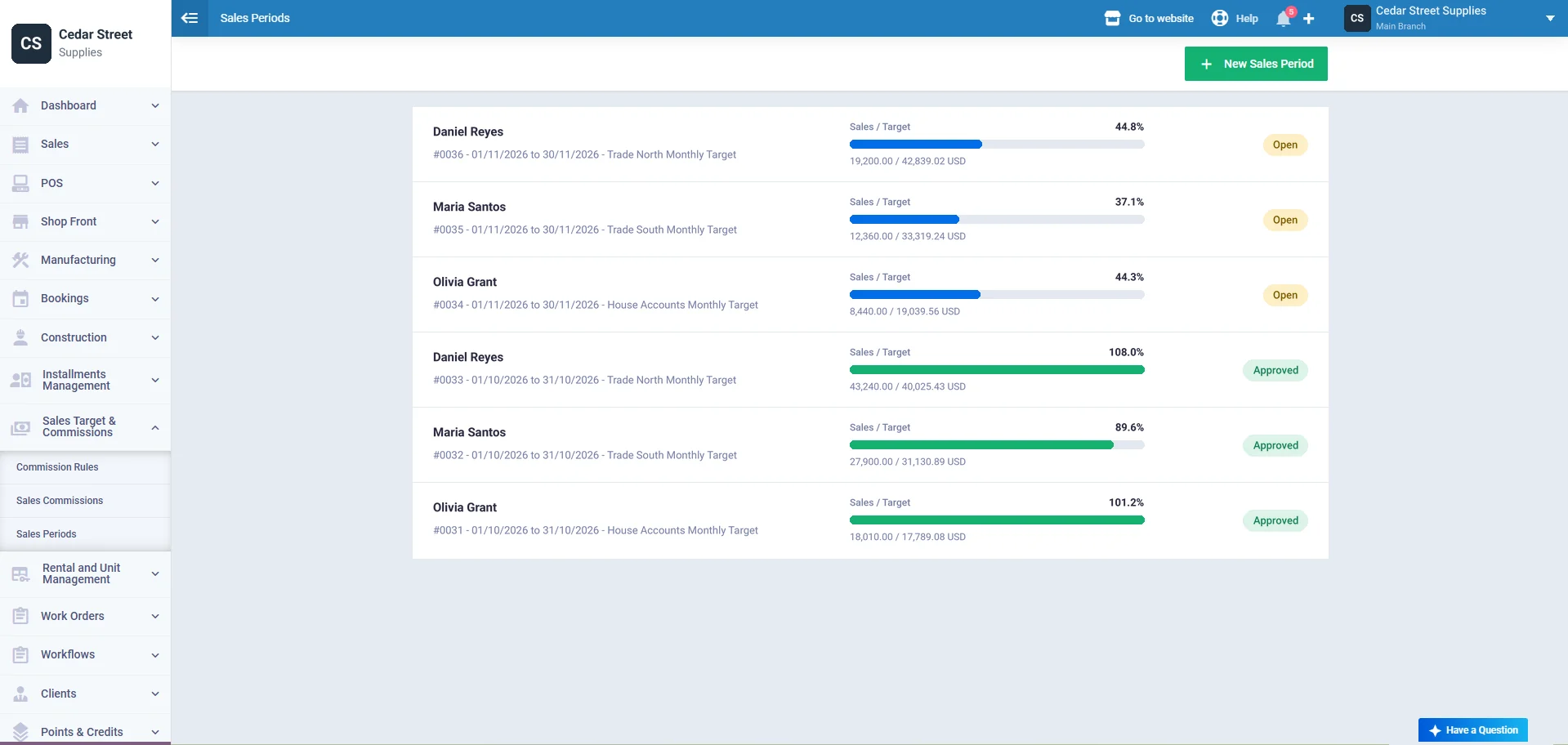
Sales Periods: Sales Against Target, Live
A sales period sets the date range and the employees in it. Its screen shows the target, a Sales / Target bar with the achievement percentage and a Total Commission card. When the period is complete, approve it to lock the commission.
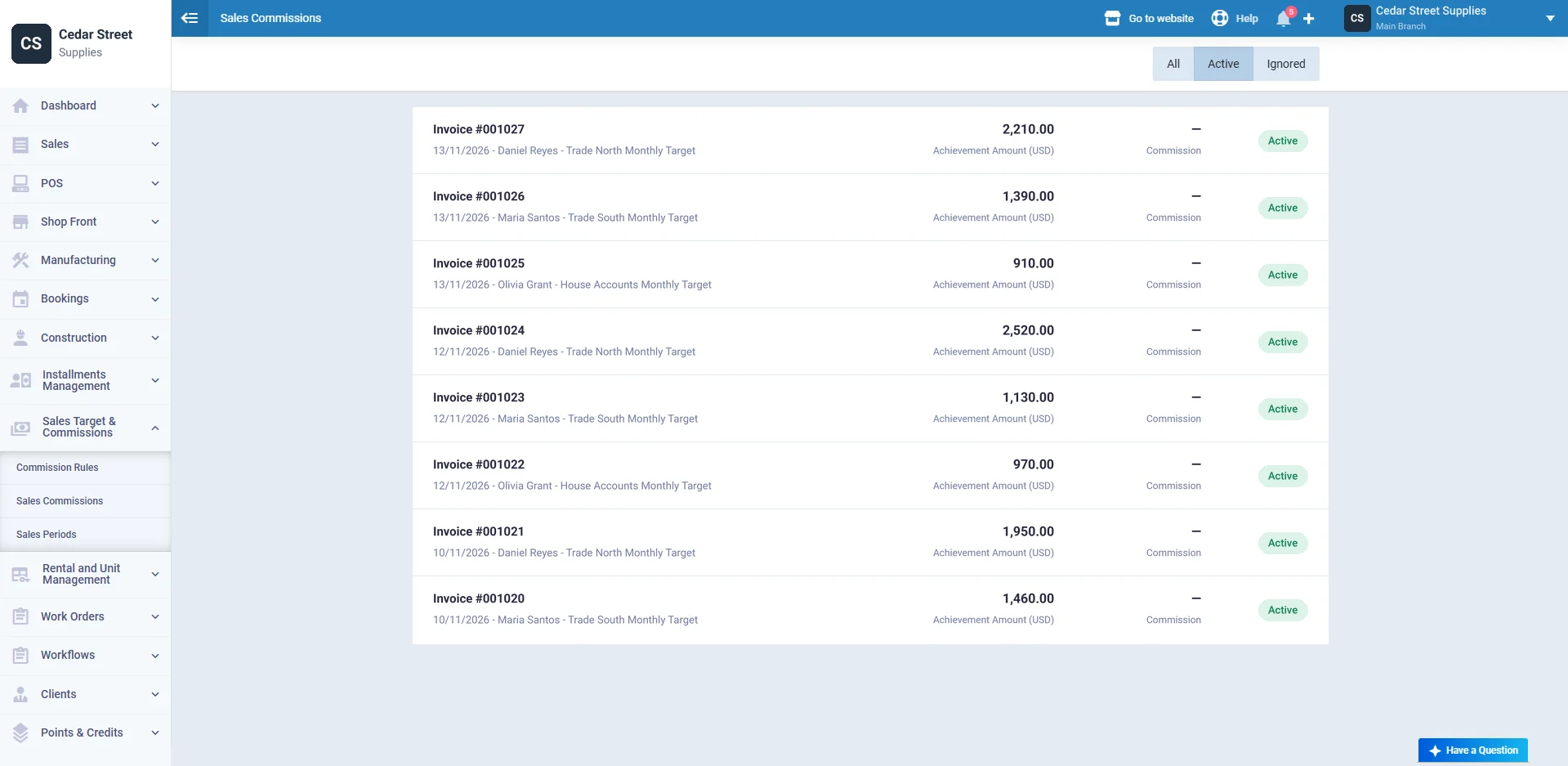
Sales Commissions: Every Invoice Counted
Each invoice adds an achievement amount: the invoice total minus discounts and VAT. New invoices raise achievement, while refunds and credit notes take it back down, as long as the period is open. Approved commissions can then be issued with payroll.
Sales Plan Template for the United States
Your financial year might not be the calendar year. That changes which months are Q1.
The IRS defines a calendar year as 12 months from January 1 to December 31, and a fiscal year as 12 consecutive months ending on the last day of any month except December 31st. Publication 538 also covers 52-53-week tax years, which always end on the same day of the week.
What to add:
- Your fiscal year's first month in Settings, so October to September reads correctly
- Sales figures without state and local sales tax, in both years
- November and December as your heaviest months if you sell to retail
That last point is real money. The National Retail Federation says November and December sales have averaged about 19% of total retail sales over five years, and more for some retailers. Divide your year by 12 and that peak disappears from the plan.
⚑ Practical note: If you use a 52-53-week year, your months won't match calendar months exactly. Treat each period as the nearest month, and keep the same rule in both years.
Sales Plan Template for the United Kingdom
Not VAT registered yet? Your sales plan might tell you when you will have to be.
GOV.UK says you must register if your total taxable turnover for the last 12 months goes over £90,000. The test rolls month by month, so it isn't tied to your financial year.
What to add:
- Your company's financial year start in Settings
- Sales without VAT, so registered and unregistered years compare fairly
- A check each month: add the last 12 months of actual sales and compare with £90,000
⚑ Practical note: VAT taxable turnover isn't always the same as your sales total, because some sales are exempt. Plan with your normal sales figures, then ask your accountant how close you are to the threshold.
Sales Plan Template for India
An Indian sales plan that starts in January has its quarters in the wrong place.
The Income Tax Department explains that the year under the Income-tax Law runs from 1st April to 31st March of the next calendar year. Most businesses plan sales on the same year, so it matches their books.
What to add:
- April as the first month in Settings, with the starting calendar year, for example 2026 for 2026-27
- Sales without GST in both years
- Your festive season months, when they carry more of the year than an even split would
⚑ Practical note: The workbook labels an April year as FY 2026/27. If your festival falls in a different month from last year, move part of that month's target to match, and note why.
Sales Plan Template for Australia
In Australia, the sales year ends on 30 June for most businesses. A plan built on January makes the end of the financial year sit in the middle.
The ATO says an entity's accounting period is ordinarily the 12-month period ending on 30 June. For GST, you must register when your GST turnover, which is gross income minus GST, reaches $75,000.
What to add:
- July as the first month in Settings
- Sales without GST, which matches how GST turnover is counted
- June as its own push, if your customers buy before the year closes
⚑ Practical note: Not registered for GST? The ATO checks both your current turnover (this month plus the past 11) and your projected turnover. Your plan for the next 12 months is a good place to spot the second one.
Who Can Use the Sales Plan Template?
Small Business Owners
You are the sales team. One sales plan template tells you whether this month was good enough, without waiting for the accountant. It doubles as your sales goals worksheet.
Sales Managers
Set shares, read the Reps sheet, and coach the person at 86.7% before the quarter closes. Pair it with a sales KPI template to see why a number moved.
Wholesalers and Distributors
Many product lines, different seasons. Per-product growth lets a growing line and a shrinking one sit in the same plan honestly.
Retailers
Holiday months, sale weeks and public holidays all bend the year. A retail business can use the weekly sales plan to set store targets that respect them.
Service Businesses
List services instead of products. The math doesn't care whether you sell boxes or hours.
Looking for other sales files? Browse all free business templates.
Sales Plan Glossary
| Term | What it means |
|---|---|
| Sales target | The amount you plan to sell in a period. |
| Achievement | Actual sales divided by target, as a percentage. |
| Target to date | The target for the months closed so far. |
| Run rate | The monthly pace needed to finish on target. |
| Seasonality | The pattern of busy and slow months across a year. |
| Financial year | The 12-month year your business plans and reports on. |
| Gap check | The plan total compared with the company target. |
Key Takeaways
- A sales plan template turns one annual number into monthly targets by product and rep, then tracks actual sales against them.
- Shape each month on last year's same month. Office paper's January target of 25,920 is 24,000 plus 8%.
- Measure achievement against closed months only. The sample is at 96.9% to date, not 78.6% of the year.
- Read the pace, not just the total. The sample needs 104,877 a month to finish, against a plan of 92,537.
- Run the gap check early. The sample's products add up to 978,974, which is 21,026 short of the company target.
- Give new products an annual target spread like last year. Safety Gear's 60,000 starts at 5,109 in January.
- Split the month into weeks by working days. A 5 day November week carries 25,052, or 14 deals.
- Start the year where your books do: April in India, July in Australia, your own fiscal year in the US and UK.
Frequently Asked Questions
What are the steps to creating a sales plan?
Gather last year's sales by month and product. Decide the growth you're aiming for. Set monthly targets, check them against the company target, and split them by rep. Write down the actions behind the numbers. Then review actual sales against the plan every month.
How do you write a weekly sales plan?
Take the monthly target and split it by working days, so short weeks get smaller targets. Turn each week's revenue into deals needed, using your average deal value, and into opportunities, using your win rate. Log sales as they happen and review the week every Monday.
What are some good sales goals examples?
Good sales goals are specific and dated. For example: grow packaging sales 12% this year, reach 25,052 in sales in the week of November 2, or close 14 deals this week. Each one names a number, a period and, ideally, who owns it.
How do I set a realistic sales target?
Start from last year's actual sales, month by month. Add growth you can explain, such as a new product, more reps or higher prices, and set lower growth for lines that are shrinking. Then check whether the needed monthly pace looks like anything you've achieved before.
Should the sales target be split evenly across months?
Usually not. Most businesses have busy and slow months, so an even split makes some months look like failures and others look like wins. Base each month on the same month last year, and adjust for anything you know will change, such as a holiday moving.
What is the difference between a sales plan and a sales forecast?
A sales forecast predicts what you're likely to sell from history, the pipeline and trends. A sales plan sets what you've decided to sell, then measures progress against it. Many businesses build the forecast first and use it to test whether the plan is realistic.
What is a 30-60-90 day sales plan?
It's an onboarding plan for a new rep or territory, split into three 30-day phases: learning, doing and improving. It focuses on activities and milestones. Use it alongside a yearly sales plan, which sets the revenue target the new rep is building toward.
Can I use the sales plan template in Google Sheets?
Yes. The workbook uses ordinary formulas with no macros, so it works in Excel and Google Sheets. It's a free download as a sales plan template Excel file, or you can make a copy of the filled sample in Google Sheets and replace the numbers with yours.
About the Author
Omar El Bahr is a Senior Digital Growth Specialist at Enerpize, where he leads SEO, content strategy, and organic growth across international markets. He is a Forbes Communications Council contributor and has written for Entrepreneur on business communication and digital strategy.
Disclaimer
This sales plan template is a planning tool, not tax, legal or accounting advice. Tax thresholds and financial year rules change, so check current rules with an adviser before relying on them.